How to Get Mentioned in AI Search

AI search is changing how content gets discovered online. Tools like Google Search, ChatGPT, Perplexity AI, and Microsoft Copilot are moving beyond classic search result lists. Instead of showing links, they generate answers by synthesizing information from multiple sources. This shift means that traditional SEO — ranking for keywords and earning page views — isn’t the only measure of visibility anymore. You can rank well on page one and still not be cited in AI answers. That’s because AI search tools extract information based on clarity, structure, authority, and contextual relevance. For independent writers and creators, that change brings opportunity and challenge. Opportunity because clear, thoughtful content can be extracted and shared with a wider audience. Challenge because visibility now depends on how confidently an AI system can reference your work. This guide walks you through how to get mentioned in AI search in a way that emphasizes thoughtful writing, real insight, and long-term credibility. What Getting Mentioned in AI Search Really Means When we talk about getting mentioned in AI search, we mean more than ranking well. It means your content is: Cited as a source in AI-generated responses Summarized in a way that includes your ideas Used to answer real user questions directly AI tools don’t just look at keywords or backlinks. They evaluate how useful a piece of content is for answering a specific question. That means context, structure, and authority matter more than ever. Rank Math’s research shows AI systems increasingly prioritize trust signals like reputation, mentions across platforms, and clear topical context rather than pure ranking metrics. This is especially important for independent voices because AI looks for real signals of credibility — not just keyword matches. 1. Write Around Real Questions Readers Ask AI search is built on natural language queries. Users ask full questions like: How can I get my content cited in AI search results? Why isn’t my blog showing up in AI assistant responses? What’s the difference between ranking and being cited by AI? Structure your blog with headings that reflect these real questions. Use H2 and H3 headings that echo what users might type or speak into a search bar. Under each heading, answer directly. AI systems scan for relevance near the top of each section, so honesty and clarity matter. This approach benefits both readers and AI extraction. It makes your content easier to navigate and more likely to be referenced. 2. Define Key Terms Early Writers often enjoy narrative introductions. That’s great for engagement, but AI systems look for clear, extractable facts early in the text. For example: AI search visibility refers to the likelihood that your content will be cited or referenced inside AI-generated answers. That sentence alone can be pulled and used to answer a broader question. Avoid burying definitions deep in the article. Place clear explanations near the beginning of relevant sections so they can be easily extracted. 3. Build Topical Depth, Not Isolated Posts One deep article on AI search may help a little. A cluster of related articles helps a lot. AI systems build patterns. They recognize subject depth when related posts are interlinked and cover multiple angles of the same topic. For example, if you write: A guide on AI search for writers A piece on structuring content for AI extraction A comparison of traditional SEO and AI search visibility A case study of how AI answered a question using your content Internal linking between these posts reinforces topical authority. AI systems interpret that cluster as a signal that your website has comprehensive coverage. That makes it easier for them to cite your work confidently. 4. Use Structured Formatting That Supports Extraction AI tools extract well-organized blocks of text first. These elements increase the likelihood of being cited: Clear H2 and H3 headings Bullet points that break down processes Tables or lists summarizing key points A brief TL;DR at the top or end FAQ sections with precise answers For example, when explaining why your content isn’t cited, you might list the reasons: Lack of clear definitions Weak topical authority Limited external mentions Unstructured format Vague language Lists like this are easy for both humans and AI to scan. 5. Add Specific Data and Verifiable Context Generic statements like “AI search is important” don’t help AI systems extract reliable answers. Specific, verifiable context does. Use real examples, data, or clear comparisons. Quote research where possible. Attribute sources responsibly. For example, instead of saying “AI affects traffic,” you might explain how answer-based search reduces click-through on certain informational queries. That level of detail increases credibility and makes the content more useful as a referenced source. 6. Strengthen Your Credibility Signals AI systems weigh credibility signals heavily. This goes beyond backlinks. It includes: Mentions of your name or brand in other blogs or articles Quotes in expert roundups Active participation in relevant forums and communities Social proof like reviews or endorsements Rank Math’s analysis notes that brand mentions have become a more meaningful trust indicator than pure link counts. For independent writers, this means you can build visibility even without massive domain authority — as long as your name and work are referenced in credible, context-rich settings. Participate in conversations, contribute to publications in your niche, and make your author identity clear and consistent across platforms. 7. Optimize for Natural but Precise Language Writing for AI search doesn’t mean dumbed-down language. It means writing with clarity and intent. Avoid vague generalizations. Be specific. Explain processes step by step. Use real examples when possible. Craft sentences that humans appreciate and AI can parse. Balanced language increases trust and improves both reader experience and AI extraction potential. 8. Include a Focused FAQ Section FAQ sections work well because they mirror genuine user intent. AI systems often pull answers from these blocks when responding to direct questions. Good FAQ practice includes: Addressing real questions users might ask Keeping answers concise and specific Avoiding repetition from earlier sections Using self-contained sentences that make sense alone A strong FAQ
Best Editorial Calendar Tools for a Small Blog Team
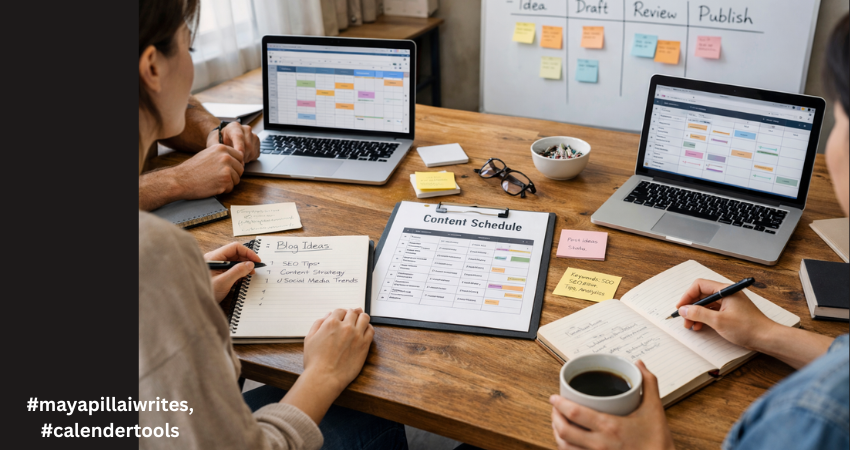
In the early days of running a blog, everything feels under control. There are only a few posts in the pipeline. A shared document seems enough. A quick WhatsApp message replaces a status update. Someone says, “I’ll publish it tomorrow,” and everyone trusts that it will happen. Then consistency kicks in. You start publishing regularly. Ideas multiply. Drafts pile up. One post is waiting for edits, another is missing keywords, and someone realizes two writers are working on almost the same topic. Deadlines begin to blur. SEO details get added at the last minute. And suddenly, what once felt simple starts feeling chaotic. This is the point where blogging shifts from a creative hobby to an operational system. And that shift is uncomfortable if you’re not prepared for it. For a blog team of 1 to 10 members, structure isn’t about bureaucracy. It’s about clarity. You don’t need complicated software. You need a tool that keeps everyone aligned without slowing them down. A system that shows what’s planned, what’s in progress, and what’s ready to go live. Before choosing any tool, it’s important to understand why having one changes everything. TL;DR If your blog team is growing and publishing consistently, managing content through chats and shared documents won’t work for long. An editorial calendar tool brings structure, visibility, and accountability to your workflow. It helps track deadlines, avoid duplicate topics, manage SEO details, and keep everyone aligned. The right tool doesn’t need to be complex, it just needs to support consistent publishing without confusion. Why a Tool Is Important for Editorial Calendar Management An editorial calendar tool brings structure to your content process. Without one, planning often lives in scattered emails, chat messages, and memory. That works for a short time. But once publishing becomes consistent, confusion follows. A tool centralizes everything in one place, including topics, deadlines, ownership, and status. Everyone can see what’s being written, what’s under review, and what’s ready to publish. That visibility reduces delays and prevents duplicated effort. It also strengthens accountability. When each post has a clear owner and a defined deadline, responsibility becomes visible. A proper tool makes it easier to track progress, manage revisions, and avoid last-minute stress. For blog teams that care about SEO, it helps ensure keywords, metadata, and internal links aren’t forgotten. Over time, this consistency improves quality and builds authority. A tool doesn’t replace discipline, but it supports it. And for any team that wants reliable publishing, that structure makes a real difference. A proper tool gives you: A centralized publishing schedule Clear ownership of each blog post Visibility into draft, edit, and publish stages Keyword and SEO tracking Better deadline discipline Reduced communication gaps In small teams, confusion spreads quickly because everyone handles multiple roles. A writer may also edit. An editor may also upload to WordPress. Without a structured system, small misses turn into bigger delays. Now let’s look at the top tools for blog-only teams and break down detailed advantages and disadvantages. 1. Notion Notion works well for blog teams that want flexibility and control. You can build a custom editorial calendar with fields for keywords, publish dates, authors, and status updates. It allows you to keep briefs, outlines, and drafts in one place. For small teams that like organizing content their own way, it offers a clean and adaptable structure. It does require discipline to keep everything organized. Advantages Fully customizable databases for blog posts Multiple views including calendar, Kanban, and list Can store content briefs, outlines, and drafts in one place Custom SEO fields such as focus keyword, meta title, internal links Easy collaboration with comments and mentions Affordable for small teams Works well for both planning and documentation Clean interface once structured properly Disadvantages Requires careful setup at the beginning No built-in advanced analytics for performance tracking Can become cluttered if naming conventions are inconsistent Large databases may slow down Limited automation compared to advanced project tools Notion works best when someone on the team maintains structure. 2. Trello Trello uses a simple board system.Trello is ideal for blog teams that prefer a visual workflow. Each blog post moves across columns such as Idea, Draft, Review, and Published. It’s simple to learn and easy to maintain. For teams that don’t want complex dashboards or setup time, Trello keeps things straightforward. However, it may feel limited if you need detailed SEO tracking. Advantages Extremely easy to learn Visual workflow using drag-and-drop cards Quick onboarding for new team members Clear status tracking at a glance Lightweight and not overwhelming Integration options through Power-Ups Good for teams that prefer visual progress tracking Disadvantages Limited SEO field customization unless upgraded No deep reporting or performance dashboards Can feel cluttered as blog volume increases Less suitable for detailed documentation storage Not ideal for managing multiple content categories at scale Trello is strong for straightforward blog workflows without complex requirements. 3. ClickUp ClickUp suits blog teams that are growing and need more structure. It allows custom fields for SEO, clear task ownership, and timeline views. If your blog involves multiple writers, editors, and strict deadlines, ClickUp gives stronger workflow control. It can feel complex at first, but it offers scalability if your content operation expands. Advantages Multiple views including calendar, list, and timeline Custom fields for SEO tracking Task dependencies for structured workflows Built-in documentation Automation options for reminders and status changes Strong reporting dashboards Scales well as blog output increases Workload view for managing writer capacity Disadvantages Steeper learning curve Interface can feel overwhelming for small teams Setup takes time and planning Too many features for very simple blog workflows Paid plans required for advanced features ClickUp suits blog teams closer to 8–10 members who need more control. 4. Asana Asana is helpful when deadlines and accountability are priorities. It clearly assigns tasks and tracks progress through timelines and milestones. For blog teams that follow structured approval processes, it keeps responsibilities visible. While it isn’t built specifically for long-form draft storage, it works well for managing
Alt Text vs Image Caption, What’s the Difference

Most bloggers upload images and move on. They focus on the picture itself and forget the small details that sit around it. But those details matter more than people think. They influence how readers move through your content, how easily they understand your message, and how search engines interpret your page. Alt text and image captions are two elements that deserve more attention. They look simple, but they do important work behind the scenes. If you want a deeper understanding of alt text, you can read my blog on why alt text matters and how to get it right. Alt text helps people who cannot see the image and helps search engines understand what the image shows. Captions guide readers who can see the image by adding quick context and pointing out what matters. When you use both the right way, your content feels clearer and more thoughtful. It becomes easier to read, easier to skim, and more accessible for everyone. These small additions also support better structure because they help readers move smoothly from one idea to the next. TL;DR Alt text is hidden descriptive text that helps screen readers and search engines understand your image. Captions are visible text below an image that help readers understand what they are seeing. Both matter for clarity, accessibility, and user experience. Alt text supports accessibility while captions guide readers who can see the image. What Alt Text Really Does Alt text is useful when the reader cannot see the image. This could be due to a broken image, slow loading, or because the person is using a screen reader. Alt text gives the essential meaning so the reader does not miss the point. Search engines also rely on alt text. It helps Google understand the image context and match it to relevant searches. This improves accessibility and SEO at the same time. Good alt text avoids decorating the sentence. It focuses only on the essential visual information. A simple description often works best. Alt text stays hidden, while captions always sit in the open. What Image Captions Do Captions are visible to every reader. They sit under the image and guide the reader by adding context. They can explain the purpose of the image, point out a detail, or support the paragraph around it. Captions improve readability and help with flow. Many readers scan captions before reading the full article. A clear caption helps them understand the importance of the image at a glance. Captions do not have strong direct SEO value, but they help with user engagement. Better engagement supports overall search performance. Alt text works behind the scenes and captions appear in the live view. Differences Between Alt Text and Image Captions A simple table for clarity. Point of Difference Alt Text Image Caption Purpose Explains the image when it cannot be seen Supports the image when it is visible Visibility Hidden within the HTML tag Shown under the image SEO Role Helps image search and ranking signals Helps readability and engagement, low direct SEO Accessibility Required for accessible content Optional, not required Writing Style Short, simple, factual Conversational and flexible Placement Inside the image tag In the article body Detail Level Essential meaning only Can include extra context Search Appearance Helps with Google Images Appears in article content only When It Appears When image fails to load or via screen reader Always visible Audience Screen readers and search engines Human readers Using both strengthens your content. Alt text helps with accessibility and SEO. Captions help guide the reader and make your article smooth to read. Together, they improve the structure and clarity of your blog. Bloggers use both alt text and captions to make images easier to understand. How to Write Good Alt Text Good alt text is simple, clear, and meaningful. It focuses on the message the image is supposed to convey, not on making the description fancy. You are writing for someone who cannot see the image, so clarity matters more than creativity. Start by identifying the purpose of the image. Ask yourself what message the reader should understand from it. Your alt text should reflect that purpose in plain language. Be specific but avoid over-describing. Mention details only if they help the reader understand the image better. Skip colors, emotions, or guesses unless they are important to the message. Keep your sentences short. You are not writing a caption. You are giving essential information to someone who depends on it to understand your content. Here are a few guidelines that help: Describe only what matters. If the image is decorative, leave the alt text empty. Avoid phrases like “image of” or “picture of.” Screen readers already know it is an image. Use keywords only when relevant. Never force a keyword; it weakens accessibility. Match the image to the article’s context. If the picture is part of a tutorial, describe the step or action. Think of it like reading the image aloud. Simple, natural language is always better. Example: Instead of “a beautiful woman working happily on a laptop at a stylish cafe” Try “woman typing on a laptop at a cafe table” The second version is factual, simple, and avoids assumptions about emotions. Good alt text supports both accessibility and search visibility. It also keeps your writing clean and helpful. How to Write Good Captions Good captions help your readers understand why the image is in your blog. They don’t repeat what the photo shows. Instead, they add clarity or context. Start by pointing out what the reader should pay attention to. If the image supports a point in your post, the caption should highlight that point. It helps the reader make the connection between the image and the message. Keep your captions short. One or two lines work best. Long captions interrupt the reading flow. Captions can add tone or personality. In a personal blog, they can feel warm. In an educational blog, they can give a quick hint or explanation. The goal
How to Write a TL;DR

Most people don’t read every word on a page. According to the Nielsen Norman Group, users typically read only 20–28% of the text during an average visit. Add to this the reality that mobile readers scroll even faster, and you can see why summaries matter. A TL;DR (Too Long; Didn’t Read) gives readers the gist of your content in seconds. It keeps busy professionals from bouncing away and signals search engines that your article is structured, clear, and helpful. In the age of AI-powered search results and Google’s SGE (Search Generative Experience), TL;DRs have become even more powerful. They help your content get picked up for answer boxes, voice search, and AI-generated snippets. If you want your content to rank and resonate, you need a TL;DR that does more than summarize. It should hook readers, highlight value, and improve your visibility in search. Here are 10 practical tips on how to write a TL;DR that works for both people and algorithms. TL;DR Tips to Write TL;DR A TL;DR condenses your content into under 100 words. Write it last so it reflects the full piece. Use short sentences or bullets for clarity. Highlight reader value, not every detail. Place it near the top for maximum impact. Add focus keywords naturally for SEO and SGE. Match your article’s tone. Adapt TL;DRs for blogs, social, and reports. Test formats to see what performs better. Treat it as a hook, not an afterthought. Key Takeaways A TL;DR is not optional — it’s essential for both readers with short attention spans and search engines (especially AI-driven ones like Google SGE).Always write it last so it reflects the true essence of your content. Keep it short and direct — under 100 words, ideally 2–3 sentences or 3–5 bullets. Focus on reader value, not details — answer “what’s in it for me?” Use bullets or short sentences to make it scannable. Place the TL;DR near the top of the article, right after the intro. Add your focus keyword naturally for SEO and AI search visibility. Match the tone of your content so it feels consistent. Adapt it for platforms — bullets for blogs, conversational for LinkedIn, one-liners for Threads/X. Test and refine different formats; track engagement and adjust. Treat the TL;DR as a hook and pitch, not an afterthought. 10 Practical Tips to Write TL;DR 1. Write the TL;DR Last You need to understand your content fully before summarizing it. Writing the TL;DR after finishing your piece helps you capture the most important takeaways, not just what you think is important at the start. Think of it as writing the back-cover blurb of a book—you wouldn’t draft it before finishing the story. 2. Keep It Under 100 Words Readers want a quick grasp, not another mini-article. Aim for 2–3 sentences or 3–5 bullet points. Anything longer loses the “instant clarity” effect. On mobile, your TL;DR should fit on one screen without scrolling. Conciseness makes it powerful. 3. Focus on Reader Value Don’t summarize everything. Instead, answer the reader’s main question: What’s in it for me? Highlight the key outcomes, benefits, or lessons. If your blog is about writing productivity, your TL;DR should say, “These tips will help you write faster without losing quality” instead of simply stating that the article “lists productivity tools.” 4. Use Bullets for Clarity Bullets make TL;DRs easy to skim. They also break down points visually, so readers can digest them at a glance. If your article has multiple sections, bullets give structure without overwhelming. For long-form posts, this format is especially effective. 5. Place It at the Top A TL;DR works best right after your introduction. This is where readers decide whether to stay or leave. By placing it near the top, you show respect for their time and increase engagement. Search engines also give weight to summaries that appear early in the text. 6. Add Keywords Naturally For SEO and SGE, weave your focus keyword naturally into the TL;DR. For example, if your post is about how to write a TL;DR, make sure that phrase appears once in the summary. Don’t overstuff; keep it natural and conversational. Keywords here help search engines understand your content quickly. 7. Match the Tone of the Content If your article is casual, your TL;DR should be too. If it’s professional and research-driven, keep it crisp and precise. Consistency builds trust and makes the summary feel like an extension of the article, not a separate add-on. 8. Adapt It for Platforms Not every TL;DR looks the same. On a blog, bullets work well. On LinkedIn, you can expand it into 3–4 conversational sentences. On X (Twitter), shrink it into one sharp one-liner. By tailoring your TL;DR, you make your content reusable across platforms without feeling repetitive. 9. Test Different Formats Experiment with different styles—bullets vs. short paragraphs, one-line vs. multi-sentence. Check your analytics for scroll depth, bounce rate, and engagement. If your TL;DR is doing its job, you’ll see people spending more time on the page and scrolling deeper. If not, refine it until you find what resonates. 10. Treat It as a Hook, Not an Afterthought A TL;DR is more than a summary. It’s a pitch to convince readers your article is worth their time. Don’t tack it on quickly. Spend a few minutes refining it, because it may end up being the most-read part of your piece. Think of it as your first impression—make it count. Quick FAQs Q1. What is a TL;DR in writing? A TL;DR is a short summary that highlights the key points of an article, report, or post. It helps readers get the main message quickly without reading the entire text. Q2. How long should a TL;DR be? A TL;DR should be under 100 words. Keep it to 2–3 sentences or 3–5 bullet points so readers can understand it in seconds. Q3. Where should I place a TL;DR in a blog? Place your TL;DR near the top, usually after the introduction. This helps readers decide whether they want to
Timeless Writing Advice from C.S. Lewis That Still Inspires Today

Great writing isn’t just about stringing words together—it’s about clarity, rhythm, and authenticity. Decades ago, C.S. Lewis shared simple yet profound advice that still resonates today. From silencing distractions to writing with passion and precision, his words serve as a timeless guide for anyone looking to sharpen their craft. Whether you’re drafting your next LinkedIn post or penning your first book, Lewis’s wisdom reminds us that writing well is an art—and it all starts with the fundamentals.
Why Content Writing Is the $135 Billion Strategy Your Business Can’t Afford to Ignore
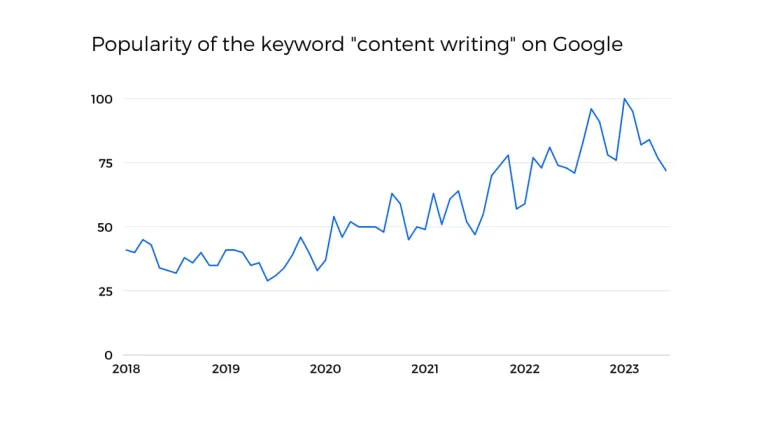
Content writing statistics reveal a powerful truth: 97% of marketers consider content an essential element in their strategy, and it’s no wonder why. With the content marketing industry poised to surpass $135 billion by 2026, the race for businesses to create impactful content has never been fiercer. If content is king, then well-crafted, data-backed articles are the crown jewels that convert casual browsers into loyal customers. Yet, crafting content that cuts through the noise isn’t just an art—it’s an essential business tactic. Whether you’re a seasoned content writer or a business looking to expand your reach, understanding the latest trends and data can spell the difference between digital obscurity and memorable engagement. Content Writing Industry Growth: More Than Just Words on a Page The content writing industry is experiencing significant growth, fundamentally transforming how businesses engage with their audiences. In 2022, 70% of B2B marketers planned to increase their content marketing budgets, recognizing that content marketing generates three times more leads than traditional advertising methods. Additionally, approximately 50% of companies intended to expand their content teams, with 75% of large organizations opting to outsource content writing tasks to specialized professionals. This trend underscores the industry’s escalating importance in business strategies, as high-quality content is increasingly viewed as a necessity rather than a luxury. Why Blogging Still Matters Did you know that “how-to” articles comprise 80% of blog content and generate 1.5 times more organic traffic than other formats? Readers are hungry for actionable, educational content. Publishing consistently—2 to 6 times per week—can result in a staggering 50% increase in clicks. Yet, more than just frequency matters; it’s about engagement. Content with visual elements like infographics or short videos sees 94% higher engagement rates. If your writing isn’t interactive or visually appealing, you could be losing a vast audience pool. The Battle with Quality and Consistency Creating compelling, high-quality content is no small feat. In fact, over 40% of content writers cite maintaining quality as their biggest challenge. Only 40% of online content is regularly updated, which leaves readers wading through outdated, irrelevant material. This gap highlights an opportunity: content creators who invest in updating their archives can reap significant SEO benefits and user trust. Writer’s Block and Creativity Challenges: About 36% of content writers struggle with generating new and unique content ideas consistently. The pressure to be original and engaging often leads to creative burnout, impacting the overall quality of their work. Time Constraints and Deadlines: Many writers find that tight deadlines compromise the quality of content. A survey revealed that 55% of content creators feel rushed to meet publishing schedules, resulting in less polished and thoughtfully crafted pieces. Evolving SEO Guidelines: SEO best practices are continually changing, which adds another layer of complexity. Content creators must stay informed and adapt quickly to new algorithms, ensuring that their content remains search-engine-friendly while still providing value to readers. Maintaining Brand Voice and Tone: Consistency in voice and tone is crucial for brand identity, yet it is one of the hardest things to get right. About 45% of businesses report that aligning content with their brand’s voice is a persistent challenge, especially when multiple writers are involved. Fact-Checking and Credibility: With so much misinformation circulating online, ensuring content accuracy is vital. Writers need to invest time in thorough research and fact-checking, as even a small mistake can harm the credibility of a brand. Overwhelming Volume of Content: The sheer volume of content published daily makes standing out difficult. Writers must craft high-quality, unique content to capture audience attention, which is a significant challenge in today’s content-saturated environment. Reader Expectations and Engagement: Modern readers expect content that is not only informative but also engaging and actionable. This expectation pushes writers to find a balance between depth and readability, ensuring every word counts without losing the reader’s interest. The Need for Multi-Channel Adaptability: Content writers are increasingly required to create adaptable content that works well across different platforms, such as blogs, social media, and email newsletters. This multi-channel approach demands a versatile writing style and strategic thinking. Capturing Reader Attention in a Sea of Information Here’s a sobering statistic: readers spend an average of just 40 seconds on a blog post. In a world where attention spans are shorter than ever, grabbing and holding interest requires an irresistible hook and immediately delivering value. One proven tactic? Interactive content like quizzes, which can increase dwell time by four to five times. Every second a user spends on your page increases the likelihood of a conversion or a long-term reader relationship. How Audience Behavior Is Shaping Content Strategies The way audiences engage with content is rapidly evolving. A striking 77% of internet users research products online before making purchasing decisions, with nearly 30% of local searches leading directly to a sale. This insight reveals the strategic importance of well-researched, SEO-optimized content that anticipates user needs. Additionally, 35% of customers make buying choices based on content that provides value and builds trust. Companies that understand these behaviors can leverage content writing to nurture leads effectively. From SEO Mastery to Social Media SEO isn’t just a buzzword; it’s a game-changer. Organic traffic can be nine times higher for content optimized with SEO strategies compared to traditional marketing. But search engines are not the only route to visibility. Social media remains a formidable distribution channel, with 77% of companies using it to amplify their content. LinkedIn, in particular, is a powerhouse for B2B marketers, fostering professional connections and brand authority. The Roadblocks and How to Navigate Them Despite the proven impact of content marketing, it’s not without its challenges. Approximately 35% of marketers find maintaining quality a consistent struggle, and 40% of B2B companies operate without a documented content strategy. Even more telling, only 35% of marketers use concrete Key Performance Indicators (KPIs) to measure success. These gaps underline a critical need for structured and well-thought-out content strategies. How to Navigate These Challenges Establish a Clear Content Strategy: To address the issue of not having a documented content