Best Editorial Calendar Tools for a Small Blog Team
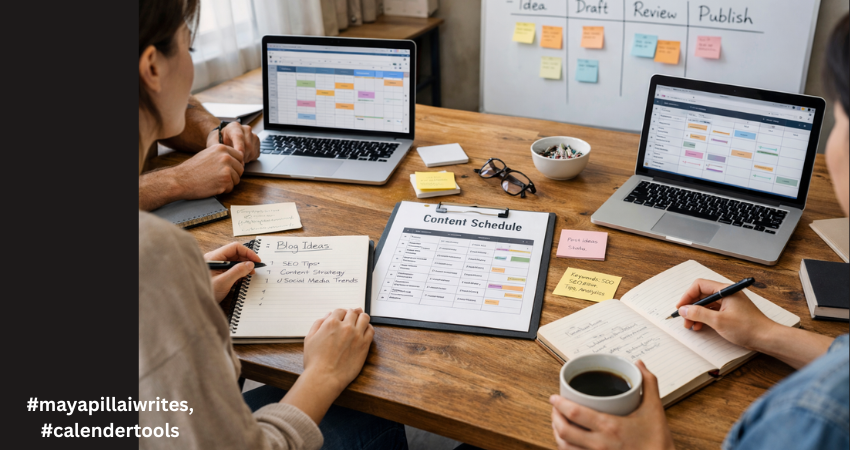
In the early days of running a blog, everything feels under control. There are only a few posts in the pipeline. A shared document seems enough. A quick WhatsApp message replaces a status update. Someone says, “I’ll publish it tomorrow,” and everyone trusts that it will happen. Then consistency kicks in. You start publishing regularly. Ideas multiply. Drafts pile up. One post is waiting for edits, another is missing keywords, and someone realizes two writers are working on almost the same topic. Deadlines begin to blur. SEO details get added at the last minute. And suddenly, what once felt simple starts feeling chaotic. This is the point where blogging shifts from a creative hobby to an operational system. And that shift is uncomfortable if you’re not prepared for it. For a blog team of 1 to 10 members, structure isn’t about bureaucracy. It’s about clarity. You don’t need complicated software. You need a tool that keeps everyone aligned without slowing them down. A system that shows what’s planned, what’s in progress, and what’s ready to go live. Before choosing any tool, it’s important to understand why having one changes everything. TL;DR If your blog team is growing and publishing consistently, managing content through chats and shared documents won’t work for long. An editorial calendar tool brings structure, visibility, and accountability to your workflow. It helps track deadlines, avoid duplicate topics, manage SEO details, and keep everyone aligned. The right tool doesn’t need to be complex, it just needs to support consistent publishing without confusion. Why a Tool Is Important for Editorial Calendar Management An editorial calendar tool brings structure to your content process. Without one, planning often lives in scattered emails, chat messages, and memory. That works for a short time. But once publishing becomes consistent, confusion follows. A tool centralizes everything in one place, including topics, deadlines, ownership, and status. Everyone can see what’s being written, what’s under review, and what’s ready to publish. That visibility reduces delays and prevents duplicated effort. It also strengthens accountability. When each post has a clear owner and a defined deadline, responsibility becomes visible. A proper tool makes it easier to track progress, manage revisions, and avoid last-minute stress. For blog teams that care about SEO, it helps ensure keywords, metadata, and internal links aren’t forgotten. Over time, this consistency improves quality and builds authority. A tool doesn’t replace discipline, but it supports it. And for any team that wants reliable publishing, that structure makes a real difference. A proper tool gives you: A centralized publishing schedule Clear ownership of each blog post Visibility into draft, edit, and publish stages Keyword and SEO tracking Better deadline discipline Reduced communication gaps In small teams, confusion spreads quickly because everyone handles multiple roles. A writer may also edit. An editor may also upload to WordPress. Without a structured system, small misses turn into bigger delays. Now let’s look at the top tools for blog-only teams and break down detailed advantages and disadvantages. 1. Notion Notion works well for blog teams that want flexibility and control. You can build a custom editorial calendar with fields for keywords, publish dates, authors, and status updates. It allows you to keep briefs, outlines, and drafts in one place. For small teams that like organizing content their own way, it offers a clean and adaptable structure. It does require discipline to keep everything organized. Advantages Fully customizable databases for blog posts Multiple views including calendar, Kanban, and list Can store content briefs, outlines, and drafts in one place Custom SEO fields such as focus keyword, meta title, internal links Easy collaboration with comments and mentions Affordable for small teams Works well for both planning and documentation Clean interface once structured properly Disadvantages Requires careful setup at the beginning No built-in advanced analytics for performance tracking Can become cluttered if naming conventions are inconsistent Large databases may slow down Limited automation compared to advanced project tools Notion works best when someone on the team maintains structure. 2. Trello Trello uses a simple board system.Trello is ideal for blog teams that prefer a visual workflow. Each blog post moves across columns such as Idea, Draft, Review, and Published. It’s simple to learn and easy to maintain. For teams that don’t want complex dashboards or setup time, Trello keeps things straightforward. However, it may feel limited if you need detailed SEO tracking. Advantages Extremely easy to learn Visual workflow using drag-and-drop cards Quick onboarding for new team members Clear status tracking at a glance Lightweight and not overwhelming Integration options through Power-Ups Good for teams that prefer visual progress tracking Disadvantages Limited SEO field customization unless upgraded No deep reporting or performance dashboards Can feel cluttered as blog volume increases Less suitable for detailed documentation storage Not ideal for managing multiple content categories at scale Trello is strong for straightforward blog workflows without complex requirements. 3. ClickUp ClickUp suits blog teams that are growing and need more structure. It allows custom fields for SEO, clear task ownership, and timeline views. If your blog involves multiple writers, editors, and strict deadlines, ClickUp gives stronger workflow control. It can feel complex at first, but it offers scalability if your content operation expands. Advantages Multiple views including calendar, list, and timeline Custom fields for SEO tracking Task dependencies for structured workflows Built-in documentation Automation options for reminders and status changes Strong reporting dashboards Scales well as blog output increases Workload view for managing writer capacity Disadvantages Steeper learning curve Interface can feel overwhelming for small teams Setup takes time and planning Too many features for very simple blog workflows Paid plans required for advanced features ClickUp suits blog teams closer to 8–10 members who need more control. 4. Asana Asana is helpful when deadlines and accountability are priorities. It clearly assigns tasks and tracks progress through timelines and milestones. For blog teams that follow structured approval processes, it keeps responsibilities visible. While it isn’t built specifically for long-form draft storage, it works well for managing
TL;DR in Content: How to Engage Readers and Rank Better
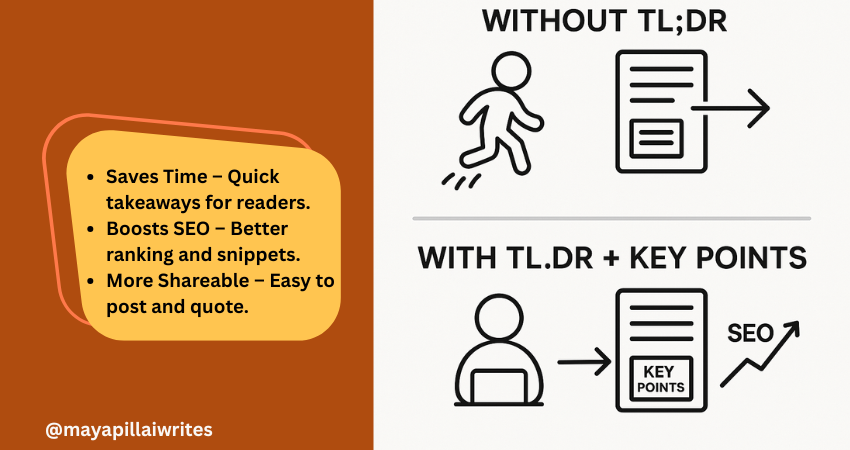
Including a TL;DR in content is no longer optional. Readers skim, AI search engines summarize, and attention spans keep shrinking. A TL;DR(Too Long; Didn’t Read) gives a quick summary that respects your readers’ time and makes your blog easier for AI tools and Google’s Search Generative Experience (SGE) to surface. But a TL;DR alone isn’t enough. Adding Key Points beneath it ensures that both skimmers and detail-seekers get value. In an era where AI decides what parts of your content get shown, these two elements can set your blog/article apart. TL; DR A TL;DR in content is a short summary that captures your article’s main idea. It helps readers, AI tools, and search engines understand your blog quickly. Key Points expand on the TL;DR with detailed highlights, giving both readers and AI more context. Using both together improves readability, SEO performance, AI search visibility, and builds trust with your audience. Key Takeaways A TL;DR isn’t just a convenience — it’s a strategic tool that improves both user experience and how AI-driven search engines interpret your content. Key Points aren’t filler; they strengthen SEO by adding structure, making your blog more likely to rank for related queries and appear in featured snippets. Pairing TL;DR and Key Points bridges the gap between human readers and AI systems, ensuring content is engaging, scannable, and machine-readable at the same time. In long-form blogs, Key Points can double as jump links for better navigation, which is especially important for mobile readers. Respecting reader time with a TL;DR and guiding them with Key Points ultimately builds trust and authority, which pays off in both engagement and search rankings. What is TL;DR in Content? TL;DR is a short summary that captures the core message of your article. Usually placed right after the introduction, it helps readers and AI tools quickly understand what the content is about. Why it’s important now: Readers want speed Most online readers don’t have the patience to go through long paragraphs before deciding if something is worth their time. A TL;DR gives them the headline takeaways immediately, allowing them to judge whether to continue reading. Without it, you risk losing them before they get to your key message. AI favors clarity Search engines and AI-powered tools are built to pick up well-structured summaries. A TL;DR written in simple, direct language makes it easier for these systems to surface your blog in snippets, SGE cards, and chat-based search results. This increases your visibility without extra effort. Boosts visibility Blogs with a TL;DR have a higher chance of being featured in “People Also Ask” boxes or summary snippets. Search engines look for clear, condensed content they can repurpose quickly, and a TL;DR is ready-made for that. Improves shareability Readers who find value in your TL;DR are more likely to copy it into a LinkedIn post, share it in a newsletter, or use it as a quote in their own content. This creates organic backlinks and visibility for your blog. Voice search ready Voice assistants like Alexa and Google Assistant prefer short, straightforward answers. A TL;DR formatted in 2–3 sentences naturally fits the length of a spoken response, which makes your blog more discoverable in voice search results. Mobile-first reading On small screens, people scroll faster and often skim through headlines only. Having a TL;DR upfront ensures your blog’s value is captured in the first screen view, even if the reader doesn’t scroll further. Trust-building By offering a summary upfront, you show readers you respect their time. It also signals confidence in your content — you’re not hiding the main message in walls of text. This creates trust and makes readers more likely to return to your blog. Supports accessibility Not all readers consume content the same way. For people with attention difficulties or those using screen readers, a TL;DR provides a simple entry point that ensures they still get value from your writing. What are Key Points? Key Points are a set of bulleted highlights that expand slightly beyond a TL;DR. While TL;DR gives the big picture, Key Points provide a roadmap of what’s inside the article. Why they’re valuable in the AI era: Act as signposts Many readers jump around instead of reading blogs linearly. Key Points act like a table of contents in miniature, showing readers what the article covers. This keeps them on your page longer because they know exactly what to expect. Strengthen SEO Search engines like Google prioritize structured content. Bullet lists with concise explanations often show up in featured snippets and “zero-click” results. By using Key Points, you give your blog multiple chances to rank for related queries, even if the reader never clicks through. Support AI summaries AI-driven platforms, including Google SGE, scan content for structured data they can repurpose. Well-written Key Points make it easier for these systems to understand your blog’s scope and deliver accurate summaries, increasing your chances of being displayed in answer cards. Increase retention When readers see clear Key Points, they know the content is organized. This makes them more likely to stay on your blog and read further. A messy block of text, in contrast, often leads to higher bounce rates. Add clarity for busy readers Some people want more than a one-line TL;DR but don’t have time for the full article. Key Points give them the middle ground: detailed highlights that still save time. It’s a way of serving both casual readers and more serious ones at the same time. Improve content navigation In long-form blogs, Key Points can be turned into clickable jump links. This is especially helpful for mobile readers, who don’t want to keep scrolling endlessly to find one section. It improves usability and keeps them engaged. Build authority Presenting your highlights clearly at the start shows confidence in your insights. It signals that you know your subject well enough to extract the main lessons upfront, which builds trust with both human readers and AI tools. TL;DR vs Key Points: Why You Need Both You might wonder, “If I already
Why Listicles Work Well
Listicles work well, and I’ve seen that firsthand. When I started using them in my blog posts, I noticed something shift—higher clicks, longer time on page, and more reader interaction. The same content in a standard paragraph format didn’t get the same results. That’s when I realized this format isn’t just convenient. It’s effective. It’s not about being trendy or lazy. It’s about writing in a way people want to read. Times have changed; the attention span of the people are short and competition is everywhere, listicles help your content stand out. Key Takeaways Listicles increase clarity, retention, and engagement. They are SEO-friendly, easy to update, and user-first. Great for both blogs and client content, especially in crowded niches. If you’re new to this format or wondering what exactly qualifies as a listicle, check out this detailed guide on what a listicle is. 9 Benefits of Listicles That Make Them Work So Well Easy to scan People rarely read full blog posts word for word. They scan for key information. Listicles present data in a format where readers can easily find what they need without committing to the entire article. Each point works as a mini-topic, making it easier to digest. Improves readability Readability directly affects user experience and bounce rate. By breaking content into bite-sized segments with clear headers and white space, listicles reduce visual fatigue. This makes it easier for readers to focus and retain information. Drives higher engagement Every list item invites continued reading. A well-crafted listicle encourages scroll behavior, which improves session duration and user interaction. If readers stay longer, they’re more likely to click internal links, comment, or share the post. Enhances SEO performance Search engines favor structured content. Listicles often secure featured snippets because the numbered format aligns with how Google parses direct answers. They also allow for strategic keyword placement without overstuffing. Fits search intent better Listicles align with the way users phrase queries—”top 10 tips for…” or “ways to…” This direct alignment improves relevance, which boosts click-through rates. Users want quick, actionable answers, and listicles deliver just that. Easier to update Unlike narrative posts, updating a listicle is simple. You can add new points, remove outdated ones, or revise sections without disrupting the entire flow. This helps maintain freshness and relevance, both of which impact SEO. Higher shareability Social media users prefer sharing content that’s concise and actionable. Listicles get more traction on platforms like LinkedIn, X (formerly Twitter), and Facebook because they are easy to quote, comment on, or summarize. Builds trust Well-organized content signals authority. When each point is backed with examples, stats, or tools, readers trust the information more. This trust increases the likelihood of return visits and conversions. Works across niches Whether it’s tech, travel, writing, or personal finance, listicles adapt. They can present how-tos, recommendations, mistakes to avoid, or trend roundups with equal efficiency. 10 Psychological Reasons Why Listicles Work Listicles don’t just perform well because of formatting. They tap into how our brains are wired to consume information. Here’s why they connect so strongly with readers: Predictability Knowing how many points to expect gives the brain a roadmap. If a list promises 10 tips, readers feel more confident committing to the article. Progress tracking Each completed point feels like progress. That subtle sense of accomplishment keeps people scrolling through to the end. Chunking of information We process data more efficiently when it’s broken into chunks. Listicles support this by separating ideas into bite-sized segments. Reduced decision fatigue A long article with no structure can feel overwhelming. A numbered list reduces the choices a reader has to make by offering clearly marked options. Cognitive ease The brain prefers simplicity. Listicles use repetition and consistency, making the reading experience smoother and more enjoyable. Anticipation and curiosity Each new item creates a small hook: “What comes next?” That micro-curiosity keeps readers engaged longer. Emotional reward Completing a list gives a small dopamine boost. Readers feel like they’ve “ticked something off,” even when passively consuming content. Visual scanning With numbered points and bold subheads, listicles are easy on the eyes. The design mirrors how people skim content, especially on mobile. Reduced bounce rates Since readers know what to expect and can move through content quickly, they’re less likely to exit mid-scroll. Mental shortcuts People rely on heuristics to make fast decisions. A numbered list feels more credible and authoritative, helping users choose your article over others. There’s a reason we prefer lists over blocks of text. It’s not just style—it’s psychology. Predictability: Knowing there are 7 or 10 items gives a clear mental map. Progress tracking: We feel a sense of accomplishment as we move down the list. Chunking: Our brains process information better in groups. Lists use this to their advantage. This structure plays a key role in retaining attention and improving content recall. Effective listicles usually share three traits: A strong promise in the title Well-researched, actionable points Clean, skimmable layout Whether it’s “5 Security Tools for Small Businesses” or “7 Mistakes to Avoid When Hiring a Writer,” high-performing listicles solve real problems in a focused way. To Sum Up Listicles work well because they make information more accessible. They suit how people read today—fast, distracted, and results-oriented. They’re not about cutting corners; they’re about delivering more value in less time. If you’re looking to increase reach, engagement, and conversions, the listicle format deserves a spot in your content strategy. CTA Want high-performing listicles for your business or client blogs? Let’s collaborate or browse more writing strategies at mayapillaiwrites.com.
Why MayapillaiWrites.com Feels Different (and Better) Than Most Content Writing Agencies

Let’s be real — finding the right content writing agency today feels like looking for clarity in a fog of buzzwords and filler posts. There are thousands of websites promising “SEO-optimised,” “high-converting,” “engaging” content. But most of them sound the same. They use big words with little depth, and deliver content that feels flat, forgettable, or worse — like it was written by a robot. That’s exactly why I created MayapillaiWrites.com — a space where content gets back to what it’s meant to do: connect, inform, and make an impact. Here’s why it feels different from most content writing agencies out there. 1. It’s Not Just About Words. It’s About Voice Anyone can write 800 words and call it a blog. But content that works — the kind that your audience reads, saves, and remembers — is built around your brand’s voice. At MayapillaiWrites.com, I don’t use templates or AI content dumps. I listen to what you want to say, how your audience speaks, and write in a tone that sounds like you. Whether it’s a homepage rewrite, product page, SEO blog, or a founder’s story — it should feel like it was written by someone who knows your business inside-out. Because I take the time to. 2. You Work With a Real Writer — Not a Layered Team Here, there’s no content manager assigning your project to a junior writer you’ll never speak to. You work directly with me — Maya Pillai. I’ve been writing for over 20 years, with a background in computer applications and deep experience in technology, cybersecurity, business storytelling, and SEO. Every piece of content is either written or reviewed by me before it reaches you. It’s personal, not processed. 3. Human-First, AI Search Optimized SEO-Optimized Content That Performs Let’s talk about search engines. Yes, I understand SEO and AI Optimization search — I’ve helped blogs rank, even in competitive niches. But here’s the difference: I never write for just Google. Your content is crafted to: Be found in search Be enjoyed by people Be remembered for your brand voice That’s what real SEO content writing should do — attract, engage, and retain. 4. It’s Not Just for Clients. It’s a Place for Writers, Too I regularly share: Writing tips that come from real-world experience Free resources and templates Insights on freelancing, branding, and storytelling This is an ecosystem, not just a service. 5. No Gimmicks. No Vanity Metrics. Just Content That Works. You won’t find “limited time offers” or “1,000 words in 24 hours” packages here. What you will find is: Writing that’s clear, clean, and compelling Process that’s collaborative Results that last beyond a post going live Because at the end of the day, good content is about clarity. Not clutter. So, Why Choose MayapillaiWrites.com? Here’s the short version: ✅ 20+ years of experience in content and strategy ✅ Direct, one-on-one collaboration ✅ SEO-optimized but human-first writing ✅ Personalised tone and structured storytelling ✅ Content for both businesses and writers ✅ No fluff. Just results. Let’s Make Your Content Matter Whether you’re building your brand, launching a product, or just need someone who can turn your thoughts into words that work — I’m here. 📌 Visit MayapillaiWrites.com 📌 Check out the blog 📌 Or reach out to start a conversation You bring the ideas. I’ll help bring them to life — one line at a time.
Website Homepage Content Writing in 2025
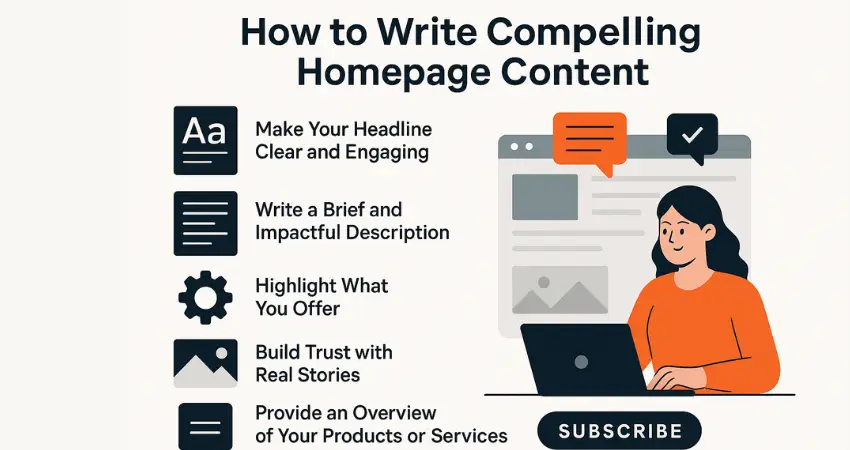
The homepage is often the most visited page on any website. It’s usually the first stop for visitors and sets the tone for how they perceive your brand. If it’s welcoming, clear, and easy to navigate, visitors are more likely to stick around and explore. Interestingly, research shows that how people experience a website (user experience or UX) is the biggest factor that sets a brand apart—even more than the actual product or price. This means having a well-thought-out, user-friendly homepage can really make a difference. Brands put a lot of effort into building trust and keeping customer loyalty. After investing so much in winning and retaining customers, it’s essential to know what will make your brand stand out. According to a marketing report, user experience (UX) has emerged as the top brand differentiator, with 28.6% of more than 1,000 marketing and branding professionals surveyed choosing it over other factors. Not only that, about 34.2% of respondents plan to focus on improving or optimizing UX to set their brand apart. While UX professionals are looking forward to integrating new trends like AI and voice interfaces in the coming years, they also face challenges. UX design has been a tricky area for some time, and many companies still experience a skills gap when it comes to creating effective UX strategies. Unfortunately, many brands find that visitors don’t go beyond the homepage. This often happens because the homepage doesn’t do enough to encourage visitors to explore the rest of the site. That’s why it’s so important to write homepage content that quickly grabs attention, clearly explains who you are, and shows how you can help. By crafting clear and engaging homepage content, you make sure visitors have a positive experience and are more likely to stick around. Let’s look at the key elements that make your homepage truly effective. Creating a homepage that draws people in and keeps them interested is essential. It’s like your website’s front door, the place where visitors decide whether to come in or move on. Here’s how to make your homepage content work for you. How to Writing Compelling Homepage Content Your homepage is the gateway to your brand. It’s the first place visitors land, and often, it’s where they decide whether to stay or move on. A well-crafted homepage not only grabs attention but also clearly communicates who you are, what you offer, and why it matters. Writing compelling homepage content requires a thoughtful balance between clear messaging, engaging visuals, and a strategic call to action. Let’s dive into how you can create a homepage that leaves a lasting impression. 1. Make Your Headline Clear and Engaging Your headline is the first thing people see. It should clearly explain what your brand offers and why it’s worth their time. Keep it simple and direct. Keep it short and to the point. Show what makes you different. Focus on how it helps your audience. A good homepage headline addresses a problem that your audience faces, offers a clear benefit, and keeps it simple. Think of it as a quick way to let visitors know they’re in the right place. For example, start by identifying a common pain point your audience has. Then, make a promise or offer a solution that directly addresses that problem. Finally, keep your wording concise and impactful—often, just a few words are enough to make your message clear. An effective headline follows three key steps: Address a common challenge your audience faces. Offer a solution or make a promise of improvement. Keep the wording simple and impactful, getting your point across without being wordy. A headline that combines these three elements is more likely to grab attention, keep visitors curious, and encourage them to explore your homepage further. Example: “Helping Small Businesses Grow with Proven Strategies.” 2. Write a Brief and Impactful Description After your headline, your description is the next thing visitors should see on your homepage. It’s a quick snapshot that helps them understand who you are and what you do. Since visitors often use this section to judge whether your brand is relevant to them, it’s crucial to make it clear and engaging. To follow the Z pattern and optimize for SEO, structure your description with the following points: Positioning: Place the description near the top of the page where it’s easily noticeable, as studies show visitors take just 2.6 seconds to focus on key areas. Content Clarity: Clearly state who your business serves and how you help. Avoid jargon and keep the language simple. Unique Value: Highlight what makes your brand different from the competition. Keyword Placement: Integrate primary keywords naturally within the description to improve search visibility. Engagement: Use actionable words to encourage readers to explore more. Example: “At [Your Brand], we help small businesses thrive by providing practical tools and resources like invoice generators and SEO tips.” 3. Highlight What You Offer Visitors come to your website because they’re looking for something specific. Usually, they either have a problem that needs solving or a goal they want to achieve—and they believe you can help them get there. That’s why it’s important to clearly showcase the features and benefits of your product or service on your homepage. It’s not just about listing what you offer but also explaining how those features translate into real benefits for your audience. If visitors can’t immediately see what they’ll gain from choosing you, they’re likely to move on to your competitors. Keep in mind that just listing features isn’t enough. You need to make it clear how those features make a difference in their lives or businesses. Benefit-driven content on your homepage can improve conversions by helping visitors see the value right away. Tips: Use icons or images to make points stand out. Clearly explain how each feature benefits the user. Make the content easy to skim. People want to know what’s in it for them. List your key offerings clearly so visitors can see the value right away. 4. Build
5 ChatGPT Prompts to Create a Social Media Plan You’ll Actually Stick To

You started the year with big plans for social media—motivated and ready to be consistent. But then life got busy, and your strategy is now just another forgotten Google Doc. If showing up consistently feels like a struggle, you’re not alone. The good news? It doesn’t have to be this way. Using the right ChatGPT prompts, you can build a social media plan that feels natural and sustainable. No more random posts—just intentional, impactful content that connects with your audience.
Amazon Listing Optimization: 7 Best Practices to Maximize Sales in 2025

Struggling to boost sales on Amazon? Optimizing your product listings is the key to standing out in a crowded marketplace. This guide covers 7 best practices for Amazon listing optimization in 2025, from mastering keyword research to leveraging A+ Content. Learn how to enhance visibility, improve conversions, and stay ahead of the competition. Implement these expert-backed strategies to maximize your Amazon sales today!
Mastering Content Marketing in 2025: The IDEAL Framework for Success

Learn how to master content marketing in 2025 with the IDEAL framework—Identify, Discover, Engage, Align, and Leverage. This guide offers actionable insights to refine your strategy, captivate your audience, and drive measurable results.
5 Ways ChatGPT Can Revolutionize Content Writing for Small Businesses and Writers in 2025

Discover how ChatGPT for content creation is transforming the writing landscape for small businesses and writers alike. From generating fresh blog ideas to polishing drafts into perfection, this AI-powered tool saves time, boosts creativity, and delivers professional results. Learn five practical ways ChatGPT can revolutionize your content strategy and help you stay ahead in the competitive world of content marketing.
4 Steps to Craft the Best Brand Voice and Tone for 2025 Success

Your brand’s voice and tone are the secret ingredients that make your business unforgettable. They define how your audience connects with your message and keeps them coming back for more. From defining your core values to tailoring your message for your audience, this blog dives into the four essential steps to craft a unique, consistent brand voice that resonates, builds trust, and drives engagement. Ready to make your brand’s personality shine? Let’s get started!