Alt Text vs Image Caption, What’s the Difference

Most bloggers upload images and move on. They focus on the picture itself and forget the small details that sit around it. But those details matter more than people think. They influence how readers move through your content, how easily they understand your message, and how search engines interpret your page. Alt text and image captions are two elements that deserve more attention. They look simple, but they do important work behind the scenes. If you want a deeper understanding of alt text, you can read my blog on why alt text matters and how to get it right. Alt text helps people who cannot see the image and helps search engines understand what the image shows. Captions guide readers who can see the image by adding quick context and pointing out what matters. When you use both the right way, your content feels clearer and more thoughtful. It becomes easier to read, easier to skim, and more accessible for everyone. These small additions also support better structure because they help readers move smoothly from one idea to the next. TL;DR Alt text is hidden descriptive text that helps screen readers and search engines understand your image. Captions are visible text below an image that help readers understand what they are seeing. Both matter for clarity, accessibility, and user experience. Alt text supports accessibility while captions guide readers who can see the image. What Alt Text Really Does Alt text is useful when the reader cannot see the image. This could be due to a broken image, slow loading, or because the person is using a screen reader. Alt text gives the essential meaning so the reader does not miss the point. Search engines also rely on alt text. It helps Google understand the image context and match it to relevant searches. This improves accessibility and SEO at the same time. Good alt text avoids decorating the sentence. It focuses only on the essential visual information. A simple description often works best. Alt text stays hidden, while captions always sit in the open. What Image Captions Do Captions are visible to every reader. They sit under the image and guide the reader by adding context. They can explain the purpose of the image, point out a detail, or support the paragraph around it. Captions improve readability and help with flow. Many readers scan captions before reading the full article. A clear caption helps them understand the importance of the image at a glance. Captions do not have strong direct SEO value, but they help with user engagement. Better engagement supports overall search performance. Alt text works behind the scenes and captions appear in the live view. Differences Between Alt Text and Image Captions A simple table for clarity. Point of Difference Alt Text Image Caption Purpose Explains the image when it cannot be seen Supports the image when it is visible Visibility Hidden within the HTML tag Shown under the image SEO Role Helps image search and ranking signals Helps readability and engagement, low direct SEO Accessibility Required for accessible content Optional, not required Writing Style Short, simple, factual Conversational and flexible Placement Inside the image tag In the article body Detail Level Essential meaning only Can include extra context Search Appearance Helps with Google Images Appears in article content only When It Appears When image fails to load or via screen reader Always visible Audience Screen readers and search engines Human readers Using both strengthens your content. Alt text helps with accessibility and SEO. Captions help guide the reader and make your article smooth to read. Together, they improve the structure and clarity of your blog. Bloggers use both alt text and captions to make images easier to understand. How to Write Good Alt Text Good alt text is simple, clear, and meaningful. It focuses on the message the image is supposed to convey, not on making the description fancy. You are writing for someone who cannot see the image, so clarity matters more than creativity. Start by identifying the purpose of the image. Ask yourself what message the reader should understand from it. Your alt text should reflect that purpose in plain language. Be specific but avoid over-describing. Mention details only if they help the reader understand the image better. Skip colors, emotions, or guesses unless they are important to the message. Keep your sentences short. You are not writing a caption. You are giving essential information to someone who depends on it to understand your content. Here are a few guidelines that help: Describe only what matters. If the image is decorative, leave the alt text empty. Avoid phrases like “image of” or “picture of.” Screen readers already know it is an image. Use keywords only when relevant. Never force a keyword; it weakens accessibility. Match the image to the article’s context. If the picture is part of a tutorial, describe the step or action. Think of it like reading the image aloud. Simple, natural language is always better. Example: Instead of “a beautiful woman working happily on a laptop at a stylish cafe” Try “woman typing on a laptop at a cafe table” The second version is factual, simple, and avoids assumptions about emotions. Good alt text supports both accessibility and search visibility. It also keeps your writing clean and helpful. How to Write Good Captions Good captions help your readers understand why the image is in your blog. They don’t repeat what the photo shows. Instead, they add clarity or context. Start by pointing out what the reader should pay attention to. If the image supports a point in your post, the caption should highlight that point. It helps the reader make the connection between the image and the message. Keep your captions short. One or two lines work best. Long captions interrupt the reading flow. Captions can add tone or personality. In a personal blog, they can feel warm. In an educational blog, they can give a quick hint or explanation. The goal
What is Image Alt Text and Why It Matters
When you upload an image to your blog, you’re adding more than a visual break. You’re adding something that readers and search engines depend on to understand your content. Every image carries meaning, and when that meaning isn’t described properly, part of your message gets lost. This is where alt text becomes essential. It gives context to people who rely on screen readers and helps them follow your content without missing anything. It also helps search engines understand what the image shows, which improves your SEO. I didn’t pay much attention to alt text when I first started writing. I learned its importance much later, and it changed the way I publish my work. That’s why I want to share this with other writers, so they don’t overlook something so simple yet so helpful. Many bloggers skip alt text or add something vague, but good alt text for images makes your blog more accessible, more readable, and far more search-friendly. This article is for bloggers, writers, content creators, and website owners who want to make their content accessible, readable, and search-friendly through better alt text. TL;DR Alt text is a short description that explains what an image shows. It helps people using screen readers and improves SEO by giving search engines the context they need. Keep it short, clear, and natural. Avoid keyword stuffing. Skip decorative images. Good alt text makes your blog accessible and easy to understand. What Is Alt Text Alt text is a brief description added to an image. It appears when the image doesn’t load and is read aloud by screen readers. Search engines also use it to understand what the image contains. So alt text supports two important things at once: accessibility and SEO. Since search engines cannot interpret visuals the way humans do, they depend on image alt text to understand context. This helps your images rank better and increases the chances of appearing in Google Image Search. That’s why alt text is important. It links directly to visibility and inclusivity. How Alt Text Improves Accessibility Alt text plays a big role in accessibility because people with visual impairments or low vision rely on screen readers to browse the web. When a screen reader reaches an image, it reads the alt text aloud. If the alt text is missing, the tool either skips the image or reads a file name like “IMG_0243.jpg”, which offers nothing useful. Clear alt text accessibility helps these readers follow your content without missing any context. It gives them the same understanding that sighted users get at a glance. The description doesn’t need to be long. It only needs to explain the one thing that matters about the image. Good alt text creates a smoother reading experience. It fills the gaps when users can’t see the visuals and keeps your content inclusive for everyone. The SEO Benefits of Alt Text Search engines depend heavily on alt text to understand what an image shows. They can’t interpret visuals the way people do, so a clear description helps Google match your image with the right searches. When your alt text is accurate, Google gets a better sense of what the page is about. This makes your content easier to index and increases the chances of your images appearing in search results, which can bring in steady, organic traffic over time. Websites often see a noticeable improvement in search visibility when they use descriptive and consistent alt text. It gives Google the context it needs and helps the algorithm understand how each image supports the main topic of the page. Two main SEO benefits of alt text stand out: Better indexing and stronger page relevance Higher visibility in Google Image Search, which can attract new readers Good alt text works quietly in the background, but it strengthens your overall SEO more than most people realize. What Makes Good Alt Text Good alt text is clear, short, and meaningful. Follow these basics: Describe the main idea of the image Keep it under 125 characters because many screen readers stop reading after that Avoid phrases like “image of” or “picture of” Add purpose only if the image supports the point you’re making Use keywords only if they feel natural Make sure the alt text matches the context of the article, not just the image alone Example: If your article is about phishing, and you have an image of a laptop, you can adjust the description to match the topic. General alt text: “A person using a laptop at a desk” Contextual alt text: “A person checking a phishing alert on a laptop screen” Context improves relevance and SEO. Common Mistakes to Avoid 1. Skipping Alt Text Completely Screen readers can’t describe the image, and Google gets no information. It harms accessibility and SEO together. 2. Keyword Stuffing Forcing keywords into alt text makes it sound unnatural and confusing. It also weakens search relevance. 3. Writing Vague or Useless Descriptions “Nice picture” or “photo” adds nothing. Alt text should explain the purpose of the image. 4. Describing Decorative Images If the image is decorative or adds no meaning, leave the alt attribute empty (alt=””). This helps screen readers skip it. 5. Over-Describing the Image Long, detailed explanations interrupt readability. Alt text should offer only what the user must know. 6. Using File Names or Auto-Generated Text Never use “IMG_1543.jpg” or “screenshot_01.png”. Replace it with a real description. 7. Adding Alt Text When the Image Is Already Fully Described Nearby If your paragraph already explains what the image shows, adding the same text again in alt text becomes redundant. Screen reader users end up hearing it twice. How to Write Alt Text for Different Types of Images Photos Describe the main subject. Example: “A woman reading a book at a desk.” Infographics Share the key message. Example: “Infographic showing phishing attacks rising from 2023 to 2025.” Screenshots Explain what the screen displays. Example: “Screenshot of Gmail showing a security alert message.” Charts and Graphs
Headings That Work: A Simple Guide for Writers and Bloggers

When I began writing online, I didn’t think much about heading levels. I used them wherever they looked nice or helped break up long text. But when I started publishing regularly and tracking how readers behaved on my blogs, I noticed a clear pattern. Posts with well-structured headings always performed better. People stayed longer, skimmed less, and understood my message faster. Over time, I realized headings do more than make text look neat. They guide your reader’s eyes, tell search engines what your article is about, and even help you think clearly while writing. Once I started treating headings as part of the storytelling process instead of simple formatting, my writing became easier, sharper, and more engaging. If you’ve ever felt your article lacks flow or looks messy no matter how good the content is, your headings might be the missing link. TL;DR Headings are not just for decoration — they’re the structure of your content. Used properly, heading levels (H1, H2, H3) make your writing easier to read, improve SEO, and help you stay organized. A clear heading hierarchy boosts readability, search visibility, and reader engagement — all without adding more words. What Are Heading Levels and Why They Exist Every blog or article follows a hierarchy of headings — H1, H2, H3, and beyond. Think of them like a table of contents that lives right inside your post. Each heading tag has a job: H1: The main title of your post. Use it once. It’s what both readers and search engines see first. H2: Main sections or topics that divide your content into clear parts. H3: Subtopics under each H2 — these help explain, list, or expand a single idea. H4–H6: Rarely needed but helpful in long or technical guides for finer detail. This hierarchy tells Google how your content is structured and helps readers quickly jump to what they care about. Without it, even the best-written article feels like one endless scroll of text. Why Heading Levels are Important Now More Than Ever Headings aren’t optional — they define how readable, searchable, and trustworthy your content feels. Let’s look at why they matter so much for both readers and writers. 1. They Make Your Blog Easier to Read Most readers don’t read word-for-word. They scan. Headings act as visual cues that guide their eyes across the page. When your H2s summarize each section well, readers can instantly decide what they want to read in depth. Imagine someone lands on your blog looking for “how to write blog introductions.” If your headings look like this: H2: Why Introductions Matter H2: Common Mistakes Writers Make H2: How to Hook Readers from the Start H3: Use a Relatable Example H3: Ask a Simple Question H3: End with a Smooth Transition They’ll immediately see that your post answers their exact question — and stay longer to read it. Readable headings reduce bounce rates, improve engagement, and give your article a natural flow. Each section feels complete and self-contained, making it easier for readers to pause and resume later without losing track. 2. They Improve SEO and Ranking Search engines rely on headings to understand your content. When your H1 includes your focus keyword and your H2s reinforce related ideas naturally, you’re telling Google exactly what your article covers. For example, if your main keyword is “content writing structure”, your headings could look like: H1: Content Writing Structure: A Complete Guide for Beginners H2: Why Structure Matters in Writing H2: Key Elements of a Well-Structured Blog H3: Using Headings and Subheadings H3: The Role of Formatting in Readability This structure helps your blog rank for both the primary keyword and related searches. Search engines also use headings to generate featured snippets, AI cards, and voice search results. Well-formatted content gives them clear sections to pull from — increasing your visibility without extra optimization tricks. The key is balance. Don’t stuff keywords into every heading. Use them where they make sense. Your goal is clarity, not clutter. 3. They Support AI Search and Voice Results AI-driven search (like Google’s SGE or Bing Copilot) doesn’t just read keywords — it reads structure. Headings help AI models understand relationships between topics, questions, and answers in your article. For example, if your H2 says “How Headings Improve SEO” and your H3 says “Why Google Prioritizes Structured Content,” you’re creating a clear logical flow. AI can then extract those sections as concise, ready-to-display responses for search queries. This structure is also useful for voice search. When someone asks, “Why are headings important in writing?” your clearly labeled section might be exactly what gets read out loud. 4. They Make Your Content Accessible Headings play a big role in accessibility. Screen readers use them to help visually impaired users navigate through a page. Proper heading hierarchy allows users to skip to sections they want instead of listening to the entire article line by line. If you rely only on bold text or large fonts instead of actual heading tags, screen readers can’t recognize the structure. That means a part of your audience might never be able to read your content properly. Accessibility isn’t just about compliance — it’s about respect for your readers. Using proper heading levels ensures everyone can enjoy and learn from your writing. 5. They Keep You Organized as a Writer Headings don’t just make your article easier to read — they make it easier to write. When you outline your H2s and H3s before writing, you’re building a roadmap for your article. Each heading acts as a checkpoint, helping you stay focused and move logically from one idea to the next. This approach also removes the stress of starting with a blank page. Once your headings are ready, all you have to do is fill in the sections. You know exactly what each part should cover, so you spend less time second-guessing what comes next. Good headings also help you see patterns. If two sections sound too similar, you’ll know it’s time to merge
Content Writing Trends 2026: How User Intent Shapes the Future of Writing
In 2026, content writing is no longer about stuffing keywords or chasing algorithms. The real shift lies in understanding user intent and search intent. These two ideas define how readers find, read, and trust your work. The top content writing trends 2026 focus on writing with purpose, clarity, and empathy while adapting to AI-driven search results and generative summaries. Who This Article Is For This article is for freelance writers, bloggers, content strategists, and digital marketers who want to stay ahead in 2026. If you write blogs, plan content calendars, or manage SEO, this guide will help you understand how intent-driven writing can improve visibility, engagement, and credibility. Reading this will help you learn how to match what people search for with what they actually want to read — the core of future-ready content. The future of content writing in 2026 revolves around understanding user intent, adapting to AI-driven search, and blending creativity with data. Writers who focus on why readers search, not just what they search, will stand out. The Shift: From Keywords to Intent For years, SEO revolved around keywords. Writers optimized headlines and meta tags to match search phrases. But 2026 marks a shift — search intent and user intent now matter more than keyword frequency. Search engines and AI models understand the “why” behind a query. Are users seeking quick information, comparison, or an in-depth answer? Writers who match that intent create content that not only ranks but also gets surfaced in Generative Search Experiences (GSE). If someone searches “best AI writing tools,” their intent might be transactional (ready to buy) or informational (looking to compare). Recognizing this difference changes how you write the intro, tone, and structure. What Are User Intent and Search Intent User intent is the reason someone types a query into a search engine. It answers why they’re searching — to learn, compare, solve, or buy something. Search intent is how that purpose appears in search behavior. It’s what Google or an AI engine interprets when showing results. For example: “What is content writing” shows informational intent — the user wants to understand. “Best freelance content writers near me” shows transactional intent — the user is ready to take action. Understanding both helps writers shape tone, format, and structure. A post written for informational intent should teach clearly. A post for transactional intent should include solutions, pricing, or calls to action. When your content matches intent, it not only ranks higher but also keeps readers on your page longer — which boosts credibility and SEO. 8 Content Trends to Lookout For in 2026 Writing for Intent, Not Just Traffic In 2026, good writing means anticipating reader expectations. Each piece must serve a purpose; solve a problem, answer a question, or guide a decision. Three main types of intent: Informational: Users want to learn (example: “What is Generative Engine Optimization?”). Navigational: They’re finding a brand or website (example: “Maya Pillai Writes blog”). Transactional: They’re ready to take action (example: “Hire a freelance content writer in India”). Before writing, define which intent your post serves. Then structure your headings, tone, and CTAs around it. AI as a Writing Partner AI is an incredible co-writer in 2026, helping writers understand search patterns and intent gaps. It can suggest structure and keywords, but human creativity still leads. Writers use AI tools to analyze which topics match real user needs and then write with empathy and voice. AI helps with clarity; you bring the context. Use it for: Draft outlines from intent-based prompts (“write a guide for beginners” vs “write comparison for experts”). Summaries optimized for voice search or generative snippets. Generative Engine Optimization (GEO) GEO is the evolution of SEO. Instead of ranking high on search pages, you’re aiming to be cited or summarized in AI-powered search responses. To succeed in GEO, content must be clear, structured, and aligned with intent. A simple, human explanation often performs better than keyword-heavy text. When someone asks “how to write for user intent,” AI search tools will quote concise, trustworthy paragraphs that sound conversational. What helps: Direct answers under subheadings Bullet points for clarity Questions as headers for AI comprehension Dual Content Format: Deep vs Quick Readers have split attention. They want instant answers and deeper insights. That means balancing short-form content for discovery with long-form for authority. Short posts capture curiosity. Long-form builds expertise and trust. A content writer who can write both is more valuable than one who focuses only on one format. Create layered content — a quick summary on social media that leads to an in-depth post on your blog. Personalization Based on Intent Personalization now depends on where the user is in their journey, not just demographics. Someone exploring a topic for the first time doesn’t need expert jargon. Write for stages: Awareness: Keep it simple, relatable, and educational. Consideration: Add comparisons, statistics, and credibility. Decision: Include examples, testimonials, or CTAs. This approach improves user engagement and matches search engine expectations for high-intent relevance. Thought Leadership: The Return of the Human Voice In a sea of AI-generated content, an authentic voice stands out. Readers can sense when something is written with experience versus algorithmic filler. Share what you’ve learned. Use real examples. Admit mistakes. That’s how trust builds — especially in niches like content strategy or cybersecurity where credibility matters. Multi-Format Content for Search Diversity 2026 rewards content that exists in multiple forms — articles, videos, podcasts, and carousels. Voice search and visual summaries are driving visibility. Writers need to repurpose intelligently: Blog → audio summary → LinkedIn carousel Long-form → newsletter takeaway → 30-second reel Each version can serve a different user intent. For example, someone scrolling social media might just want a tip, not a full tutorial. Transparency Builds Trust Readers want to know how content is made. Being open about using AI tools or referencing data creates credibility. Include short disclosures like “AI-assisted, human-edited.” Use citations, add author bios, and list your sources. Trust signals now impact ranking and reader
Common Mistakes to Avoid While Writing TL;DR
Readers today have short attention spans. They skim, scroll, and look for quick takeaways. That’s why TL;DR (Too Long; Didn’t Read) has become essential in blogs, newsletters, and even LinkedIn posts. A well-written TL;DR can pull readers in and help them grasp the main points without reading every word. But many writers get it wrong. A poorly crafted TL;DR can confuse readers or turn them away. If you’re new to the concept, you may want to read my earlier post on how to write a TL;DR before diving into the common mistakes people make. TL;DR (Why You Should Read) Keep it short and clear. Highlight the key takeaways, not the fluff. Use bullets or short sentences for easy scanning. Don’t add new points that aren’t in the article. Always place it where readers can see it. Top 10 Common Mistakes To Avoid Making It Too Long A TL;DR should act like a snapshot, not a second article. If it runs into paragraphs, it defeats its purpose. Limit it to three to five bullets or a short paragraph. The goal is clarity, not coverage. Being Too Vague Saying “This article is about writing better TL;DRs” isn’t useful. A TL;DR should summarize the main ideas. Think of it as answering: What will the reader walk away with? Avoid vague lines and focus on the specific lessons your article provides. Ignoring Structure Walls of text discourage readers. TL;DRs should be easy to scan. Use bullet points or crisp one-liners. Each point should stand on its own. For example, instead of “Summaries need clarity and keywords,” write: Keep sentences short. Use keywords naturally. 4. Leaving Out Key Points Some writers summarize only the introduction or conclusion, missing the middle. A good TL;DR should capture the most important insights across the whole article, not just one section. Overloading With Details Numbers, quotes, or side stories belong in the main article. The TL;DR is about the big picture. Don’t crowd it with examples or data. Focus on what matters most. Adding New Information Never use the TL;DR to sneak in new arguments, facts, or promotions. Readers expect a summary of what they’ve just read, not fresh material. Stick to what’s already in the post. Skipping Keywords If you’re writing for blogs, keywords matter. Forgetting them in your TL;DR is a missed chance to rank higher in search results. That’s why writers who understand why TL;DR in content is so powerful always pay attention to how it supports visibility as well as readability. Using Jargon Avoid industry-heavy terms or buzzwords that confuse readers. A TL;DR should be simple and accessible. Write it as if you’re explaining it to a friend who’s new to the topic. Forgetting the Reader Some TL;DRs read like notes for the writer. That’s not the goal. Always think: What would a new reader need to know in 30 seconds? Make the summary for them, not for you. Placing It in the Wrong Spot A TL;DR hidden at the end of the article often goes unread. Place it right after the opening paragraph, where readers can see it early. That way, they know what to expect and whether they want to read further. To Sum Up A TL;DR is a promise to your reader: “Here’s what you’ll gain without spending too much time.” If you keep it short, clear, and focused, it will build trust and encourage more people to read the full piece. Avoid the common mistakes—too long, too vague, or poorly placed—and your TL;DR will do what it’s meant to: make content easier to understand. And remember, a TL;DR isn’t just for articles. It’s tied to how you approach what is a blog in the first place. If your blog exists to serve readers, the summary should always honor their time. Key Takeaways TL;DRs work best when short, clear, and structured. Avoid vague summaries, jargon, or unnecessary details. Always reflect the article’s main points, not just one section. Use keywords to support SEO and SGE readiness. Position the TL;DR where it’s visible, ideally at the start. Quick FAQs Q1. How long should a TL;DR be? A TL;DR should be short—ideally three to five bullet points or a short paragraph. Q2. Where should I place a TL;DR in an article? Place it right after the introduction. Readers should see it before they decide whether to continue reading. Q3. Should I use keywords in a TL;DR? Yes. Keywords help your summary rank better and match search intent, but use them naturally. Q4. Can I use TL;DRs on social media? Absolutely. TL;DRs work well for LinkedIn, X, and Threads posts, where readers prefer quick takeaways. Q5. What’s the biggest mistake writers make with TL;DRs? The most common mistake is making it too long or too vague, which defeats the purpose.
How to Write a TL;DR
Most people don’t read every word on a page. According to the Nielsen Norman Group, users typically read only 20–28% of the text during an average visit. Add to this the reality that mobile readers scroll even faster, and you can see why summaries matter. A TL;DR (Too Long; Didn’t Read) gives readers the gist of your content in seconds. It keeps busy professionals from bouncing away and signals search engines that your article is structured, clear, and helpful. In the age of AI-powered search results and Google’s SGE (Search Generative Experience), TL;DRs have become even more powerful. They help your content get picked up for answer boxes, voice search, and AI-generated snippets. If you want your content to rank and resonate, you need a TL;DR that does more than summarize. It should hook readers, highlight value, and improve your visibility in search. Here are 10 practical tips on how to write a TL;DR that works for both people and algorithms. TL;DR Tips to Write TL;DR A TL;DR condenses your content into under 100 words. Write it last so it reflects the full piece. Use short sentences or bullets for clarity. Highlight reader value, not every detail. Place it near the top for maximum impact. Add focus keywords naturally for SEO and SGE. Match your article’s tone. Adapt TL;DRs for blogs, social, and reports. Test formats to see what performs better. Treat it as a hook, not an afterthought. Key Takeaways A TL;DR is not optional — it’s essential for both readers with short attention spans and search engines (especially AI-driven ones like Google SGE).Always write it last so it reflects the true essence of your content. Keep it short and direct — under 100 words, ideally 2–3 sentences or 3–5 bullets. Focus on reader value, not details — answer “what’s in it for me?” Use bullets or short sentences to make it scannable. Place the TL;DR near the top of the article, right after the intro. Add your focus keyword naturally for SEO and AI search visibility. Match the tone of your content so it feels consistent. Adapt it for platforms — bullets for blogs, conversational for LinkedIn, one-liners for Threads/X. Test and refine different formats; track engagement and adjust. Treat the TL;DR as a hook and pitch, not an afterthought. 10 Practical Tips to Write TL;DR 1. Write the TL;DR Last You need to understand your content fully before summarizing it. Writing the TL;DR after finishing your piece helps you capture the most important takeaways, not just what you think is important at the start. Think of it as writing the back-cover blurb of a book—you wouldn’t draft it before finishing the story. 2. Keep It Under 100 Words Readers want a quick grasp, not another mini-article. Aim for 2–3 sentences or 3–5 bullet points. Anything longer loses the “instant clarity” effect. On mobile, your TL;DR should fit on one screen without scrolling. Conciseness makes it powerful. 3. Focus on Reader Value Don’t summarize everything. Instead, answer the reader’s main question: What’s in it for me? Highlight the key outcomes, benefits, or lessons. If your blog is about writing productivity, your TL;DR should say, “These tips will help you write faster without losing quality” instead of simply stating that the article “lists productivity tools.” 4. Use Bullets for Clarity Bullets make TL;DRs easy to skim. They also break down points visually, so readers can digest them at a glance. If your article has multiple sections, bullets give structure without overwhelming. For long-form posts, this format is especially effective. 5. Place It at the Top A TL;DR works best right after your introduction. This is where readers decide whether to stay or leave. By placing it near the top, you show respect for their time and increase engagement. Search engines also give weight to summaries that appear early in the text. 6. Add Keywords Naturally For SEO and SGE, weave your focus keyword naturally into the TL;DR. For example, if your post is about how to write a TL;DR, make sure that phrase appears once in the summary. Don’t overstuff; keep it natural and conversational. Keywords here help search engines understand your content quickly. 7. Match the Tone of the Content If your article is casual, your TL;DR should be too. If it’s professional and research-driven, keep it crisp and precise. Consistency builds trust and makes the summary feel like an extension of the article, not a separate add-on. 8. Adapt It for Platforms Not every TL;DR looks the same. On a blog, bullets work well. On LinkedIn, you can expand it into 3–4 conversational sentences. On X (Twitter), shrink it into one sharp one-liner. By tailoring your TL;DR, you make your content reusable across platforms without feeling repetitive. 9. Test Different Formats Experiment with different styles—bullets vs. short paragraphs, one-line vs. multi-sentence. Check your analytics for scroll depth, bounce rate, and engagement. If your TL;DR is doing its job, you’ll see people spending more time on the page and scrolling deeper. If not, refine it until you find what resonates. 10. Treat It as a Hook, Not an Afterthought A TL;DR is more than a summary. It’s a pitch to convince readers your article is worth their time. Don’t tack it on quickly. Spend a few minutes refining it, because it may end up being the most-read part of your piece. Think of it as your first impression—make it count. Quick FAQs Q1. What is a TL;DR in writing? A TL;DR is a short summary that highlights the key points of an article, report, or post. It helps readers get the main message quickly without reading the entire text. Q2. How long should a TL;DR be? A TL;DR should be under 100 words. Keep it to 2–3 sentences or 3–5 bullet points so readers can understand it in seconds. Q3. Where should I place a TL;DR in a blog? Place your TL;DR near the top, usually after the introduction. This helps readers decide whether they want to
TL;DR in Content: How to Engage Readers and Rank Better
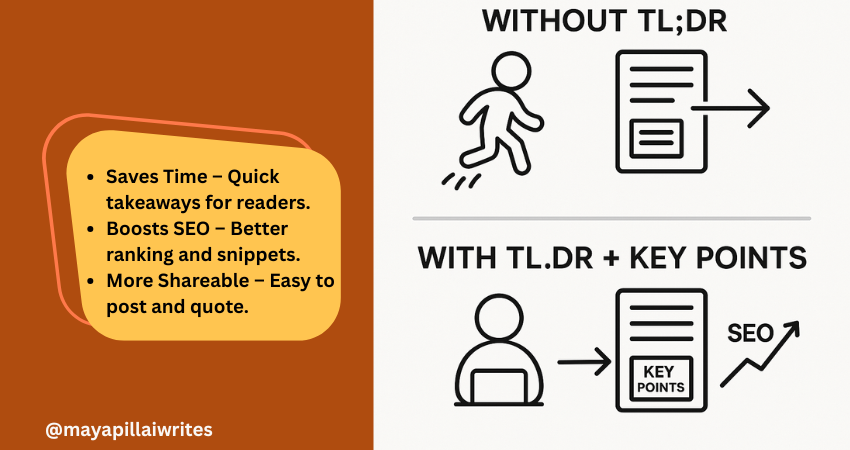
Including a TL;DR in content is no longer optional. Readers skim, AI search engines summarize, and attention spans keep shrinking. A TL;DR(Too Long; Didn’t Read) gives a quick summary that respects your readers’ time and makes your blog easier for AI tools and Google’s Search Generative Experience (SGE) to surface. But a TL;DR alone isn’t enough. Adding Key Points beneath it ensures that both skimmers and detail-seekers get value. In an era where AI decides what parts of your content get shown, these two elements can set your blog/article apart. TL; DR A TL;DR in content is a short summary that captures your article’s main idea. It helps readers, AI tools, and search engines understand your blog quickly. Key Points expand on the TL;DR with detailed highlights, giving both readers and AI more context. Using both together improves readability, SEO performance, AI search visibility, and builds trust with your audience. Key Takeaways A TL;DR isn’t just a convenience — it’s a strategic tool that improves both user experience and how AI-driven search engines interpret your content. Key Points aren’t filler; they strengthen SEO by adding structure, making your blog more likely to rank for related queries and appear in featured snippets. Pairing TL;DR and Key Points bridges the gap between human readers and AI systems, ensuring content is engaging, scannable, and machine-readable at the same time. In long-form blogs, Key Points can double as jump links for better navigation, which is especially important for mobile readers. Respecting reader time with a TL;DR and guiding them with Key Points ultimately builds trust and authority, which pays off in both engagement and search rankings. What is TL;DR in Content? TL;DR is a short summary that captures the core message of your article. Usually placed right after the introduction, it helps readers and AI tools quickly understand what the content is about. Why it’s important now: Readers want speed Most online readers don’t have the patience to go through long paragraphs before deciding if something is worth their time. A TL;DR gives them the headline takeaways immediately, allowing them to judge whether to continue reading. Without it, you risk losing them before they get to your key message. AI favors clarity Search engines and AI-powered tools are built to pick up well-structured summaries. A TL;DR written in simple, direct language makes it easier for these systems to surface your blog in snippets, SGE cards, and chat-based search results. This increases your visibility without extra effort. Boosts visibility Blogs with a TL;DR have a higher chance of being featured in “People Also Ask” boxes or summary snippets. Search engines look for clear, condensed content they can repurpose quickly, and a TL;DR is ready-made for that. Improves shareability Readers who find value in your TL;DR are more likely to copy it into a LinkedIn post, share it in a newsletter, or use it as a quote in their own content. This creates organic backlinks and visibility for your blog. Voice search ready Voice assistants like Alexa and Google Assistant prefer short, straightforward answers. A TL;DR formatted in 2–3 sentences naturally fits the length of a spoken response, which makes your blog more discoverable in voice search results. Mobile-first reading On small screens, people scroll faster and often skim through headlines only. Having a TL;DR upfront ensures your blog’s value is captured in the first screen view, even if the reader doesn’t scroll further. Trust-building By offering a summary upfront, you show readers you respect their time. It also signals confidence in your content — you’re not hiding the main message in walls of text. This creates trust and makes readers more likely to return to your blog. Supports accessibility Not all readers consume content the same way. For people with attention difficulties or those using screen readers, a TL;DR provides a simple entry point that ensures they still get value from your writing. What are Key Points? Key Points are a set of bulleted highlights that expand slightly beyond a TL;DR. While TL;DR gives the big picture, Key Points provide a roadmap of what’s inside the article. Why they’re valuable in the AI era: Act as signposts Many readers jump around instead of reading blogs linearly. Key Points act like a table of contents in miniature, showing readers what the article covers. This keeps them on your page longer because they know exactly what to expect. Strengthen SEO Search engines like Google prioritize structured content. Bullet lists with concise explanations often show up in featured snippets and “zero-click” results. By using Key Points, you give your blog multiple chances to rank for related queries, even if the reader never clicks through. Support AI summaries AI-driven platforms, including Google SGE, scan content for structured data they can repurpose. Well-written Key Points make it easier for these systems to understand your blog’s scope and deliver accurate summaries, increasing your chances of being displayed in answer cards. Increase retention When readers see clear Key Points, they know the content is organized. This makes them more likely to stay on your blog and read further. A messy block of text, in contrast, often leads to higher bounce rates. Add clarity for busy readers Some people want more than a one-line TL;DR but don’t have time for the full article. Key Points give them the middle ground: detailed highlights that still save time. It’s a way of serving both casual readers and more serious ones at the same time. Improve content navigation In long-form blogs, Key Points can be turned into clickable jump links. This is especially helpful for mobile readers, who don’t want to keep scrolling endlessly to find one section. It improves usability and keeps them engaged. Build authority Presenting your highlights clearly at the start shows confidence in your insights. It signals that you know your subject well enough to extract the main lessons upfront, which builds trust with both human readers and AI tools. TL;DR vs Key Points: Why You Need Both You might wonder, “If I already
Why Content Writing Is the $135 Billion Strategy Your Business Can’t Afford to Ignore
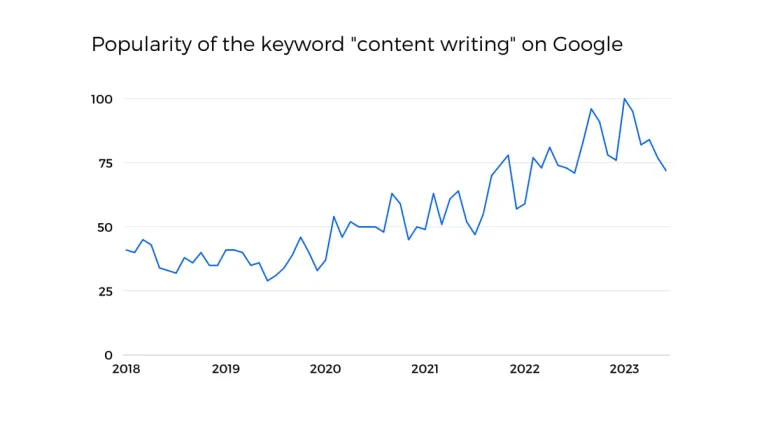
Content writing statistics reveal a powerful truth: 97% of marketers consider content an essential element in their strategy, and it’s no wonder why. With the content marketing industry poised to surpass $135 billion by 2026, the race for businesses to create impactful content has never been fiercer. If content is king, then well-crafted, data-backed articles are the crown jewels that convert casual browsers into loyal customers. Yet, crafting content that cuts through the noise isn’t just an art—it’s an essential business tactic. Whether you’re a seasoned content writer or a business looking to expand your reach, understanding the latest trends and data can spell the difference between digital obscurity and memorable engagement. Content Writing Industry Growth: More Than Just Words on a Page The content writing industry is experiencing significant growth, fundamentally transforming how businesses engage with their audiences. In 2022, 70% of B2B marketers planned to increase their content marketing budgets, recognizing that content marketing generates three times more leads than traditional advertising methods. Additionally, approximately 50% of companies intended to expand their content teams, with 75% of large organizations opting to outsource content writing tasks to specialized professionals. This trend underscores the industry’s escalating importance in business strategies, as high-quality content is increasingly viewed as a necessity rather than a luxury. Why Blogging Still Matters Did you know that “how-to” articles comprise 80% of blog content and generate 1.5 times more organic traffic than other formats? Readers are hungry for actionable, educational content. Publishing consistently—2 to 6 times per week—can result in a staggering 50% increase in clicks. Yet, more than just frequency matters; it’s about engagement. Content with visual elements like infographics or short videos sees 94% higher engagement rates. If your writing isn’t interactive or visually appealing, you could be losing a vast audience pool. The Battle with Quality and Consistency Creating compelling, high-quality content is no small feat. In fact, over 40% of content writers cite maintaining quality as their biggest challenge. Only 40% of online content is regularly updated, which leaves readers wading through outdated, irrelevant material. This gap highlights an opportunity: content creators who invest in updating their archives can reap significant SEO benefits and user trust. Writer’s Block and Creativity Challenges: About 36% of content writers struggle with generating new and unique content ideas consistently. The pressure to be original and engaging often leads to creative burnout, impacting the overall quality of their work. Time Constraints and Deadlines: Many writers find that tight deadlines compromise the quality of content. A survey revealed that 55% of content creators feel rushed to meet publishing schedules, resulting in less polished and thoughtfully crafted pieces. Evolving SEO Guidelines: SEO best practices are continually changing, which adds another layer of complexity. Content creators must stay informed and adapt quickly to new algorithms, ensuring that their content remains search-engine-friendly while still providing value to readers. Maintaining Brand Voice and Tone: Consistency in voice and tone is crucial for brand identity, yet it is one of the hardest things to get right. About 45% of businesses report that aligning content with their brand’s voice is a persistent challenge, especially when multiple writers are involved. Fact-Checking and Credibility: With so much misinformation circulating online, ensuring content accuracy is vital. Writers need to invest time in thorough research and fact-checking, as even a small mistake can harm the credibility of a brand. Overwhelming Volume of Content: The sheer volume of content published daily makes standing out difficult. Writers must craft high-quality, unique content to capture audience attention, which is a significant challenge in today’s content-saturated environment. Reader Expectations and Engagement: Modern readers expect content that is not only informative but also engaging and actionable. This expectation pushes writers to find a balance between depth and readability, ensuring every word counts without losing the reader’s interest. The Need for Multi-Channel Adaptability: Content writers are increasingly required to create adaptable content that works well across different platforms, such as blogs, social media, and email newsletters. This multi-channel approach demands a versatile writing style and strategic thinking. Capturing Reader Attention in a Sea of Information Here’s a sobering statistic: readers spend an average of just 40 seconds on a blog post. In a world where attention spans are shorter than ever, grabbing and holding interest requires an irresistible hook and immediately delivering value. One proven tactic? Interactive content like quizzes, which can increase dwell time by four to five times. Every second a user spends on your page increases the likelihood of a conversion or a long-term reader relationship. How Audience Behavior Is Shaping Content Strategies The way audiences engage with content is rapidly evolving. A striking 77% of internet users research products online before making purchasing decisions, with nearly 30% of local searches leading directly to a sale. This insight reveals the strategic importance of well-researched, SEO-optimized content that anticipates user needs. Additionally, 35% of customers make buying choices based on content that provides value and builds trust. Companies that understand these behaviors can leverage content writing to nurture leads effectively. From SEO Mastery to Social Media SEO isn’t just a buzzword; it’s a game-changer. Organic traffic can be nine times higher for content optimized with SEO strategies compared to traditional marketing. But search engines are not the only route to visibility. Social media remains a formidable distribution channel, with 77% of companies using it to amplify their content. LinkedIn, in particular, is a powerhouse for B2B marketers, fostering professional connections and brand authority. The Roadblocks and How to Navigate Them Despite the proven impact of content marketing, it’s not without its challenges. Approximately 35% of marketers find maintaining quality a consistent struggle, and 40% of B2B companies operate without a documented content strategy. Even more telling, only 35% of marketers use concrete Key Performance Indicators (KPIs) to measure success. These gaps underline a critical need for structured and well-thought-out content strategies. How to Navigate These Challenges Establish a Clear Content Strategy: To address the issue of not having a documented content
Using British and American English Interchangeably in Travel Writing

When it comes to travel writing, the world is your oyster – and so is the language you choose. Whether you’re writing for an audience in London or Los Angeles, one of the key questions you might face is: Can you use British and American English interchangeably? The short answer is yes – but with a few considerations to keep your content clear, engaging, and relevant to your readers. Understanding the Basics of British and American English The differences between British and American English go beyond just spelling. It’s about vocabulary, grammar, and sometimes even meaning. For example, while Brits might pack their luggage before a holiday, Americans are preparing their baggage for a vacation. If you’re heading to the US, you might fill up your car with gas, but in the UK, you’ll need petrol. Using British and American Terms: Know Your Audience Before deciding how to blend the two, consider who you’re writing for. If your audience is primarily British, phrases like “lift” (elevator), “pavement” (sidewalk), and “roundabout” (traffic circle) will resonate more. Conversely, for an American audience, “elevator,” “sidewalk,” and “traffic circle” would feel more natural. However, what if your audience is global? Here’s where it gets interesting. Mixing British and American English can actually add a layer of authenticity to your travel writing, especially if you’re covering destinations from both regions. For example, when describing your layover (stopover) in New York and your car hire (rental) in London, using both terms shows respect for the local lingo while keeping it relatable for all readers. Consistency is Key in B2B Writing While it’s tempting to mix things up, consistency is essential, especially in business-to-business (B2B) travel writing. Imagine you’re creating content for a travel agency that caters to both British and American clients. In this case, it’s best to choose either British or American English and stick with it throughout the piece to maintain professionalism. For example, a British-based agency should refer to a “return ticket” instead of a “round-trip ticket.” Consistency ensures clarity and helps build trust with your audience. The last thing you want is for a reader to feel confused or think you’ve made a typo when you’re actually switching between English variants. Casual Writing? Get Creative! If you’re writing a blog, an article, or a social media post with a more casual tone, feel free to mix both forms of English. In fact, it can be a great way to add flavor to your content and connect with a wider audience. Here’s an example: “Planning a vacation (holiday) in the UK? After you touch down at Heathrow, grab a cab (taxi) and head to your hotel. Once you’ve checked in and taken the lift (elevator) to your room, unwind before your next adventure. And if you’re heading out to dinner, don’t forget to check the sidewalk (pavement) for a cozy pub to enjoy some local fare.” By using both British and American terms, you cater to readers from both sides of the pond and give your writing an international feel. Mind the SEO: Search Engines Love Consistency For content aimed at search engine optimization (SEO), choosing one form of English is usually best. Why? Because search engines like Google will recognize the consistency and align it with user searches. So, if your target audience is primarily in the US, stick to American spellings and vocabulary. If you’re aiming for the UK or global readers, British English might be more effective. That said, in blog content, using both versions (e.g., “vacation (holiday)” or “gasoline (petrol)”) can help ensure your content is picked up by a broader range of search queries without feeling redundant. Bridging the Language Divide in Travel Writing Mixing British and American English in your travel writing doesn’t have to be confusing. As long as you understand your audience and keep your messaging clear, you can seamlessly blend both forms of English, adding depth to your writing while appealing to a global audience. Whether you’re writing a guide for exploring the best highways (motorways) of America or a cozy blog about British holiday (vacation) destinations, using both types of English can make your content feel inclusive and accessible. So, the next time you’re writing about a subway (underground) ride in New York or a road trip through the countryside (countryside) in Scotland, feel free to mix and match. Just make sure you’re doing it intentionally and with your readers in mind. To Wrap Up The beauty of travel writing lies in its ability to bring people from different cultures together. And what better way to do that than by weaving together both British and American English? Just remember to keep things clear, consistent (where needed), and engaging. After all, your readers, no matter where they are, are looking for a journey—both in your writing and in the destinations you describe.