Artificial intelligence has changed the way content is created, researched, and optimized. As a content writer, I’ve seen firsthand how AI content tools have evolved from simple writing assistants into powerful platforms that support research, ideation, editing, and productivity.
Table of Contents
ToggleDespite the concerns surrounding AI, one thing has become increasingly clear: AI is not replacing good writers. Instead, it is becoming part of the modern writer’s toolkit. Whether you’re a freelancer, blogger, copywriter, content marketer, or someone looking to start a writing career, understanding how AI tools work can help you become more productive without sacrificing quality.
The key is knowing which tools to use, when to use them, and how to maintain your expertise and voice throughout the content creation process.
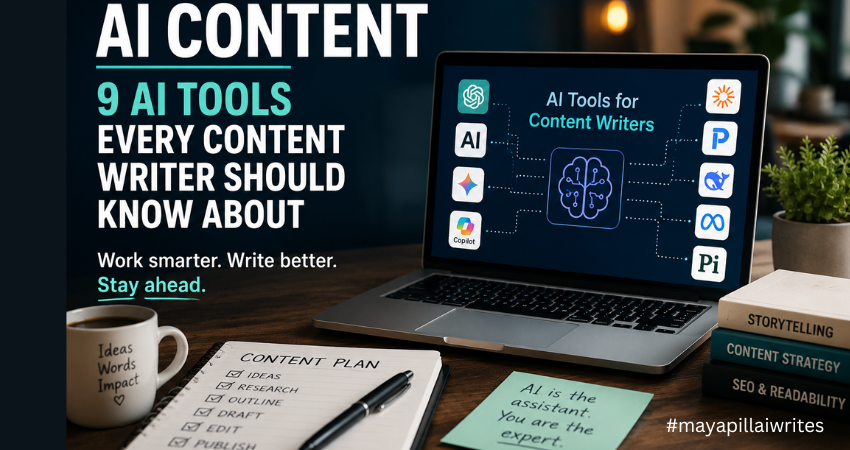
In this article, I’ll walk through nine AI tools that content writers should know about, compare their strengths, and explain how they can support modern content workflows.
The Growing Role of AI in Content Creation
Businesses are producing more content than ever before. Websites need blog posts. Brands need newsletters. E-commerce stores need product descriptions. Marketing teams need social media content, case studies, white papers, and landing pages.
At the same time, Google continues to prioritize high-quality content that demonstrates Experience, Expertise, Authoritativeness, and Trustworthiness (E-E-A-T).
This creates a challenge for writers. We need to produce content consistently while maintaining accuracy, originality, and value. That’s where AI content tools can help.
Rather than replacing writers, these tools help reduce time spent on repetitive tasks such as:
- Research
- Topic ideation
- Outlining
- Editing
- Content optimization
- Summarization
The most successful writers use AI to improve efficiency while keeping human judgment at the center of the process.
Before I discuss the tools on this list, I want to mention the one I use most often. While every tool has its strengths, ChatGPT remains my preferred AI assistant for content creation.
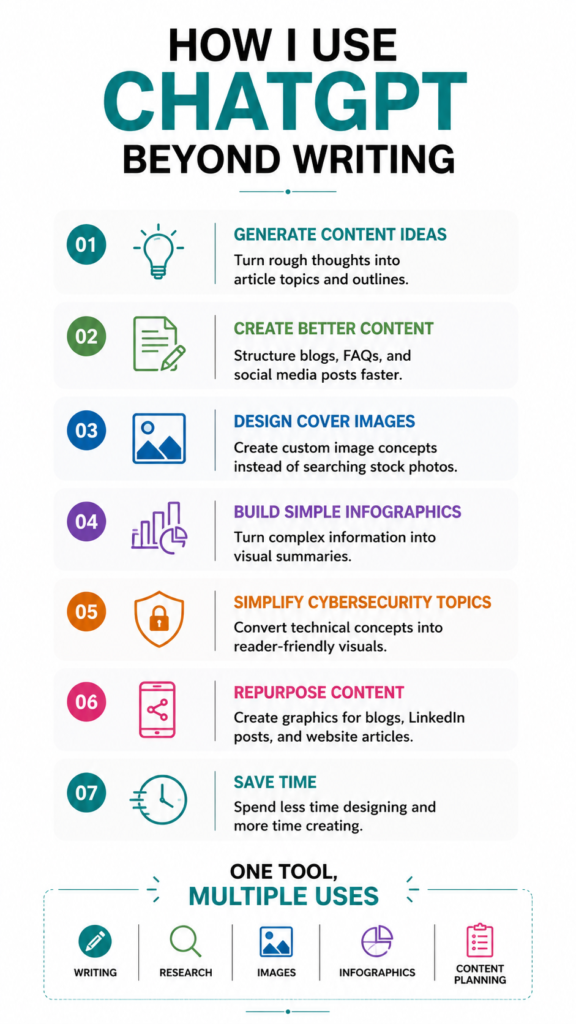
Over time, it has become a regular part of my writing workflow, helping me research, brainstorm, structure articles, refine ideas, and even create cover images and infographics for my content.
I’ve experimented with several AI tools over the past few years. Some are excellent at research. Others are better suited for long-form writing, technical documentation, or social media content. Each tool serves a different purpose, and I don’t believe there’s a single “perfect” AI platform for every writer.
Yet I keep coming back to ChatGPT. Part of the reason is how naturally it fits into my workflow. I don’t simply use it to write articles for me. Instead, I use it to organize thoughts, explore different angles, identify content gaps, and develop stronger outlines before I start writing.
One of the biggest challenges writers face is getting started. Sometimes the ideas are there, but they are scattered. ChatGPT helps me bring those ideas together and create a structure that makes the writing process easier.
I also appreciate its flexibility. On any given day, I might be working on a cybersecurity article, website copy for a client, a LinkedIn post, or a personal blog. ChatGPT adapts well to different formats, audiences, and writing styles, which makes it useful across multiple projects.
Another reason I rely on it is the time it saves. Content creation involves much more than writing. Research, outlines, content briefs, FAQs, title suggestions, meta descriptions, and social media snippets all take time. ChatGPT helps speed up those tasks, allowing me to spend more time on research, storytelling, and editing.
Beyond writing, I also use ChatGPT to support the visual side of content creation. For many of my articles, I create custom cover images and simple infographics using AI-generated prompts. Instead of spending hours searching for the right stock image or trying to explain a design concept from scratch, I can describe what I need and quickly generate ideas that match the topic of the article.
This has been particularly useful for cybersecurity content, where finding relevant and non-generic visuals can be challenging. I also use it when creating infographics for blog posts, LinkedIn content, and website articles. Whether I need a comparison graphic, a process flow, a timeline, or a feature breakdown, ChatGPT helps me organize the information and create clear visual concepts that are easier for readers to understand.
As content becomes increasingly visual, having a tool that assists with both written and visual content makes the entire publishing process more efficient.
As someone who writes about cybersecurity and technology, I also find it useful for simplifying complex topics. Technical concepts often need to be explained in a way that’s accessible to everyday readers. ChatGPT helps me break down complicated ideas into clear, understandable language without losing the core message.
What I value most, however, is that it feels more like a brainstorming partner than a content generator. I can ask questions, test ideas, challenge assumptions, and explore different perspectives. That collaborative aspect is what keeps me returning to it.
That said, AI is still just a tool. Every article requires fact-checking, editing, and human judgment. Personal experience, expertise, and critical thinking cannot be automated.
While ChatGPT remains my preferred choice, the reality is that every writer’s needs are different. That’s why it’s worth exploring the wider AI landscape and understanding where each tool can add value to your content creation process.
While ChatGPT has become a valuable part of my content workflow, I also believe it’s important to understand how AI platforms handle user data. As writers, we often use AI tools for research, brainstorming, and content development, which means we’re regularly sharing prompts and information with these systems.
Before using any AI tool extensively, it’s worth understanding its privacy practices, data handling policies, and security considerations. If you’re interested in learning more, I recently explored the topic in detail in my article, “ChatGPT Privacy in 2026: What Users Should Know.“
AI Content Tools Comparison Table
Tool | Best For | Major Strength | Ideal User |
ChatGPT | Content creation | Versatility | Freelancers and bloggers |
Claude | Long-form writing | Large context window | Researchers and editors |
Gemini | Research and productivity | Google integration | Content marketers |
Perplexity AI | Fact-checking | Source citations | Researchers and journalists |
Microsoft Copilot | Workplace productivity | Microsoft ecosystem | Corporate teams |
Poe | Model comparison | Multiple AI models | Advanced users |
DeepSeek | Technical writing | Strong reasoning | Technical writers |
Meta AI | Social media content | Meta platform integration | Creators and marketers |
Pi | Brainstorming | Human-like conversation | Creative writers |
1. ChatGPT
Website: https://chatgpt.com
ChatGPT remains one of the most widely used AI content tools available today.
I frequently use it to create outlines, brainstorm content ideas, simplify technical concepts, and identify content gaps before drafting an article. One reason ChatGPT is popular among writers is its flexibility. It can assist with nearly every stage of content creation.
What It Does Well
- Blog outlines
- Content briefs
- Topic ideation
- FAQ generation
- Content rewriting
- Content planning
Real-World Use Case
A freelance content writer managing five clients can use ChatGPT to create outlines and content calendars, reducing planning time significantly while maintaining quality.
2. Claude
Website: https://claude.ai
Claude has gained popularity among writers who regularly work on long-form content. What makes Claude stand out is its ability to process lengthy documents while maintaining context. This makes it useful for reviewing reports, white papers, research studies, and long-form articles.
What It Does Well
- Long-form content
- Research analysis
- Content audits
- White papers
- E-books
Real-World Use Case
A content strategist producing an industry report can upload large amounts of research and ask Claude to identify trends, summarize findings, and organize insights.
3. Google Gemini
Website: https://gemini.google.com
Gemini combines AI capabilities with Google’s ecosystem. For writers already working inside Google Docs and Google Workspace, Gemini creates a smooth workflow between research, planning, and content creation.
What It Does Well
- Research assistance
- Content summaries
- Topic exploration
- Productivity support
- Workflow integration
Real-World Use Case
A digital marketing team can use Gemini to research emerging trends and build content briefs directly within Google’s productivity tools.
4. Perplexity AI
Website: https://www.perplexity.ai
Perplexity has become one of my favorite tools for research. Unlike many AI assistants, Perplexity provides sources alongside its responses. This makes it easier to verify information and identify credible references.
What It Does Well
- Research
- Fact-checking
- Source discovery
- Trend analysis
- Citation support
Real-World Use Case
A cybersecurity writer covering a recent data breach can use Perplexity to locate incident reports, expert commentary, and supporting research before drafting an article.
5. Microsoft Copilot
Website: https://copilot.microsoft.com
Microsoft Copilot is deeply integrated with Microsoft 365 applications. For content professionals working in corporate environments, this integration can streamline document creation and collaboration.
What It Does Well
- Document drafting
- Meeting summaries
- Presentation support
- Data analysis
- Productivity workflows
Real-World Use Case
An internal communications manager can use Copilot to summarize meetings, draft announcements, and create presentation materials.
6. Poe
Website: https://poe.com
Poe takes a different approach by allowing users to access multiple AI models from a single platform. Instead of relying on one model, writers can compare responses and choose the best output.
What It Does Well
- AI model comparison
- Prompt testing
- Content experimentation
- Alternative perspectives
Real-World Use Case
A content strategist testing campaign messaging can compare outputs from several AI models before finalizing a content strategy.
7. DeepSeek
Website: https://www.deepseek.com
DeepSeek has attracted attention because of its reasoning capabilities and technical expertise. Although it is often associated with coding tasks, it can also help technical writers explain complex concepts in a simpler way.
What It Does Well
- Technical content
- Software documentation
- Structured analysis
- Research assistance
Real-World Use Case
A SaaS company creating educational blog content can use DeepSeek to explain technical features to a non-technical audience.
8. Meta AI
Website: https://www.meta.ai
Meta AI is integrated across Facebook, Instagram, WhatsApp, and Messenger. For content creators focused on social media, this creates opportunities to streamline content production and audience engagement.
What It Does Well
- Social media captions
- Campaign ideas
- Audience engagement
- Content repurposing
Real-World Use Case
A local restaurant can use Meta AI to generate Instagram caption ideas and promotional campaign concepts.
9. Pi
Website: https://pi.ai
Pi takes a more conversational approach than many AI tools. Instead of focusing solely on productivity, it acts as a discussion partner for brainstorming and idea development.
What It Does Well
- Brainstorming
- Idea exploration
- Creative discussions
- Thought development
Real-World Use Case
A personal branding consultant can use Pi to explore article ideas before turning them into blogs, newsletters, or podcasts.
To Sum Up
AI content tools have become valuable companions for modern writers. From brainstorming and research to editing and optimization, these platforms can help reduce repetitive work and improve efficiency. However, the most important lesson I’ve learned is that AI works best when paired with human expertise. Readers still value authentic experiences, unique insights, and trustworthy information.
The goal isn’t to let AI write everything for you. The goal is to use AI to support your workflow so you can spend more time creating content that genuinely helps your audience.
FAQs
What is AI content?
AI content refers to text, images, videos, or other digital assets created with the assistance of artificial intelligence tools. Writers often use AI to support research, outlining, editing, and content optimization.
Which AI tool is best for content writers?
ChatGPT, Claude, and Perplexity AI are among the most popular options. The best choice depends on whether your focus is writing, research, fact-checking, or productivity.
Can AI replace content writers?
No. AI can automate certain tasks, but it cannot replace human creativity, expertise, storytelling, critical thinking, or lived experience.
Is AI-generated content good for SEO?
AI-assisted content can perform well when it is accurate, helpful, fact-checked, and enhanced with original human insights.
Which AI tool is best for research?
Perplexity AI is widely regarded as one of the strongest AI research tools because it provides sources and citations.
What is the difference between ChatGPT and Claude?
ChatGPT is known for versatility across many tasks, while Claude is particularly strong at processing and analyzing long documents.
How do professional writers use AI?
Professional writers use AI for brainstorming, outlining, editing, research, headline creation, content planning, and identifying content gaps.
Does Google penalize AI content?
Google evaluates content based on quality and usefulness, not whether AI was involved in creating it.
Can AI help with writer’s block?
Yes. AI can generate topic ideas, article structures, and discussion prompts that help writers overcome creative blocks.
How can writers maintain E-E-A-T while using AI?
By fact-checking information, citing credible sources, adding personal experience, and ensuring content demonstrates genuine expertise and trustworthiness.